
In this guide
What Is Abstract Submission Software?
Abstract submission software is an online system used to receive proposed research presentations for a conference, congress or academic meeting. It provides an organised submission route for authors and a central record of submitted abstracts for the event team.
It is more specialised than a general contact form because an abstract has a life beyond submission. The scientific committee needs to know who submitted it, which topic it belongs to, whether the submission meets the event’s requirements, what feedback reviewers provided and what decision was eventually made.
Abstract submission is commonly one stage within wider abstract management. Submission handles the call for abstracts and incoming records; review management handles assessment and committee decisions; and accepted work may later feed into presenter communications, conference registration or programme preparation.
How the Abstract Submission Process Works: Seven Stages
-
The Organiser Publishes a Call for Abstracts
The process begins with the conference’s published requirements. The call for abstracts tells potential authors which topics are welcome, who is eligible, the deadline, accepted language, word limits, presentation arrangements and any restrictions on previously published work.
The event team translates these rules into a submission brief. For example, it must decide whether an abstract is limited to one category, whether authors can submit multiple entries and what happens if details need changing after submission.
A clearly defined call for abstracts reduces avoidable queries later. It also gives the scientific committee a consistent starting point for evaluating submissions.
-
The Author Prepares the Research and Author Information
Before opening the submission form, the author should prepare the abstract in the required structure. Depending on conference rules, that may include a title, background, methods, results and conclusion, or a different format suited to the discipline.
The author may also need the names and affiliations of co-authors, a presenting-author designation, keywords, topic category and agreement from the other contributors. These are not minor administrative details. They help organisers contact the right people, establish authorship and sort the submission for the next stage.
Where original research or patient-related information is involved, authors should also check the event’s requirements for ethics, permissions and removal of identifying information before submission.
-
The Author Completes the Online Submission Form
The form captures the information requested by the organiser in a structured submission record. It may ask the author to choose a category, supply research text, identify co-authors and confirm compliance with the call’s rules.
Different conferences may allow a text-field submission, a file upload or a combination. Some systems provide author accounts or saved drafts, while others have a more direct submission journey. Such features should never be assumed without checking the particular event’s instructions.

Before submitting, authors should review the title, affiliations, category, content and contact email carefully. Choosing the wrong category or using an incorrect email can complicate later communication even when the research itself is eligible.
-
The System Records and Acknowledges the Submission
Once an entry is successfully submitted, the system should give the author a way to identify the submission. This may be a confirmation message, email or reference number, depending on the event’s configuration.
A reference identifier is useful because it lets the organiser distinguish one abstract from another, especially if an author submits several pieces of work. It is not evidence that the abstract has been accepted; it only confirms that the submission stage has been completed.
For the Singapore Allied Health Conference 2026, the published instructions state that successful submissions receive an automated acknowledgement email with an abstract reference number. That is a concrete example of a configured conference workflow, rather than a guarantee that every abstract portal operates identically.
-
The Secretariat Organises Submissions and Closes the Call
As abstracts arrive, the conference secretariat needs a usable overview of what has been received. Submission categories, author information and event-specific fields help organisers prepare the records for the scientific committee.
The team must also manage practical questions: whether submissions close at a particular local time, what an author should do if their confirmation is missing, whether duplicate submissions are permitted and how exceptions are handled.
At the deadline, the event’s policy determines whether authors can still edit existing records. A platform feature does not override a published conference rule. Organisers should communicate the policy clearly before the portal opens.
-
The Scientific Committee Reviews and Scores the Abstracts
Submission is the beginning of the evaluation process, not its conclusion. After the call closes, submitted abstracts may be distributed among reviewers or evaluated by an appointed scientific committee.
Reviewers assess work against criteria chosen by the conference, such as relevance, originality, methodological quality or potential contribution to the programme. They may provide scores and comments to support the committee’s decision.

Klobbi’s abstract management software supports reviewer assignment, configured scoring, reviewer ratings and comments, and tracking of review activity. More specialised requirements such as anonymous review, conflict-of-interest declarations or multiple revision rounds should be confirmed during project scoping rather than assumed.
-
The Committee Makes Decisions and Presenters Prepare
After review, the organising committee decides which submissions will be accepted, rejected or considered for particular presentation formats. The event may allocate accepted work to oral talks, posters or another format.
Authors then follow the conference’s instructions. Accepted presenters may need to confirm participation, register as delegates, prepare slides or posters, or provide revised presentation materials. These steps depend on the organiser’s policies and are not always automated by the abstract portal.
This is where the abstract submission workflow connects to the broader conference operation: the scientific decision identifies who will present, while conference registration manages the attendee’s pass, payment, confirmation and event access where applicable.
What Information Does an Abstract Submission Form Collect?
A useful abstract submission form collects information the scientific committee genuinely needs, rather than adding fields simply because the software allows them. Typical examples include:
| Field | Why the organiser asks for it |
|---|---|
| Abstract title | Identifies the research and supports later listings |
| Submitting author | Identifies who is responsible for the entry |
| Presenting author | Establishes who is expected to deliver the presentation |
| Co-authors and affiliations | Records contributors and institutional details |
| Email address | Enables submission and decision correspondence |
| Topic or category | Helps organise submissions and review assignments |
| Abstract body | Supplies the scientific or professional content to be assessed |
| Keywords | Helps describe or group the subject matter |
| Presentation preference | Indicates oral/poster preferences where the conference permits them |
| Declarations | Captures any author permissions or event-specific acknowledgements |
No event necessarily needs every field. The organiser should define which details are required, which are optional and which should be requested only after a submission is accepted.
The Three People Behind Every Abstract Submission
The Author or Presenting Author
The author prepares an eligible abstract and supplies accurate information. They should understand the deadline, category and publication conditions before clicking submit. If the conference requires co-author approval, obtaining it remains the author’s responsibility.
The Conference Secretariat
The secretariat translates the call for abstracts into an operational process. It defines submission fields, handles queries, maintains deadline information, organises incoming records and prepares them for the committee. This role matters even where much of the data collection happens online.
The Scientific or Programme Committee
The committee evaluates content and decides what belongs in the conference programme. Reviewers may supply scores and comments, but the conference’s scientific governance determines the criteria, final decisions and presentation allocation.
The separation is important: abstract software supports the work, while authors and committees remain responsible for the content and scientific judgement.
Why Abstract Submission Rules Differ Between Conferences
The basic submission lifecycle is familiar, but real conference instructions show how much the details can vary.
At the Singapore Allied Health Conference 2026, submissions were organised into eight thematic categories, each abstract could be placed in one category, and the abstract limit was 500 words. The Scientific Committee—not the submitting author—allocated successful abstracts to oral or poster presentation according to review scores. The event’s published instructions also described acknowledgement and reference numbers.
The Singapore Healthcare and Biomedical Congress 2026 took a different approach. Its scientific competition specified a 250-word abstract body, permitted authors to edit submitted work until the stated deadline and allowed a preference for oral, poster or both categories in applicable cases.
These examples illustrate a critical principle: word limits, edit permissions, category rules and presentation preferences are conference policies. They should be communicated in the call for abstracts and reflected in the submission setup where the chosen software supports them.
SAHC is a Klobbi-powered event example. The SHBC example is an independently published conference workflow; it is not evidence that SHBC uses Klobbi.
What Happens After an Abstract Is Accepted?
Acceptance often triggers a different set of tasks from the original submission. The conference may ask a presenting author to confirm availability, register for the conference, provide a biography, prepare an oral presentation or submit a poster by a later date.
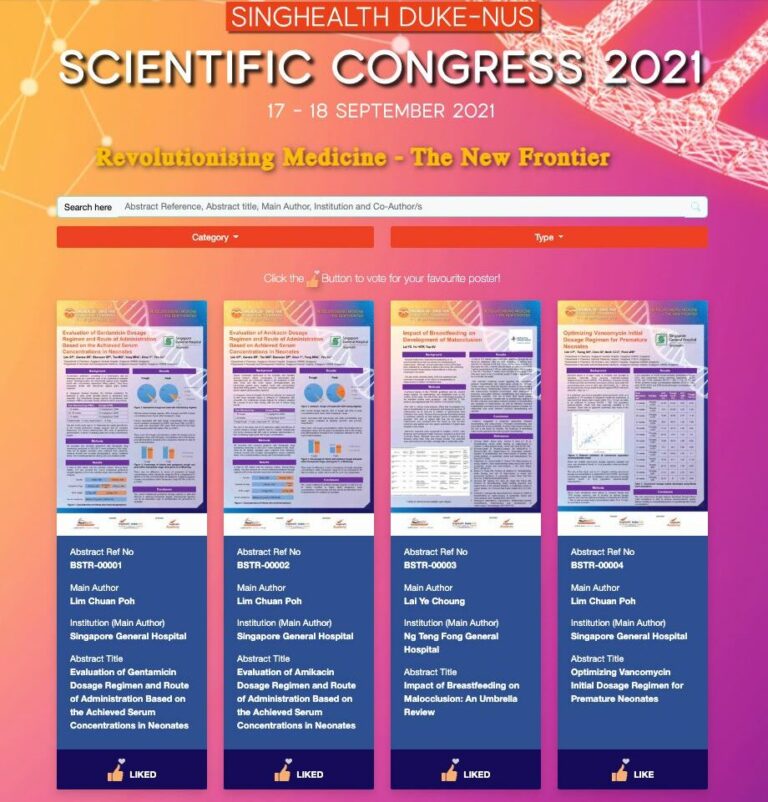
An accepted abstract may also need to be displayed in a searchable abstract collection or prepared for the conference programme. Klobbi’s abstract management solution supports online display of research content, including searches by category, author and abstract title.
However, acceptance does not automatically mean the author has completed delegate registration. These are separate records and obligations unless the event has explicitly configured a combined process. Klobbi’s conference registration system addresses the pass, payment and attendance requirements, while abstract management concentrates on the research content and its evaluation.
Abstract Submission Software vs Abstract Management Software
These terms overlap, but their emphasis is different.
Abstract submission software focuses on the author-facing intake: the call for abstracts, forms, author information, submission categories, deadlines and acknowledgement.
Abstract management software covers a wider lifecycle that can include collecting submissions, assigning reviewers, scoring and comments, recording committee decisions and displaying accepted research.
When evaluating technology, organisers should check the complete process they need rather than assume every ‘submission portal’ includes sophisticated scientific review tools. Conversely, a committee with simple requirements may not need every advanced workflow available on the market.
Klobbi offers an abstract management solution covering configurable submissions, reviewer assignment, scoring, review activity and online abstract display, with implementation support for event-specific needs.
Abstract Submission Checklist for Conference Organisers
Before opening a call for abstracts, confirm these operational details:
- Define eligible contributors and accepted research types.
- Publish the opening date, closing date, time zone and contact information.
- Set abstract word limits, language and permitted content formats.
- Decide whether each abstract can have one or several topic categories.
- Define submitting, corresponding and presenting author responsibilities.
- Confirm required author permissions and privacy information.
- Test the submission form using realistic sample entries.
- Check what confirmation or reference an author receives.
- Publish a clear rule for corrections, withdrawals and revisions.
- Set scoring criteria, reviewer responsibilities and committee decision dates.
- Plan acceptance communications, presentation instructions and delegate registration.
- Test how the organiser will retrieve submission records and manage exceptions.
This checklist is a workflow planning tool, not a list of features automatically included with every abstract submission platform.
Frequently Asked Questions
Do authors need to create an account to submit an abstract?
Some conferences require author accounts, while others use a different submission route. Follow the specific event's instructions. An account requirement should not be assumed from the phrase 'online abstract submission software'.
Can authors submit more than one abstract?
That depends on the conference. Some events allow multiple submissions, while others impose limits or require specific contributor roles. The published call for abstracts takes precedence.
Can an abstract be edited after submission?
Policies vary. For instance, SHBC 2026 allowed edits up to its published closing time. Other conferences may lock submitted records earlier. Authors should confirm the permitted correction process before the deadline.
Does a submission confirmation mean the abstract has been accepted?
No. A successful-submission acknowledgement confirms receipt. Acceptance is a later scientific or programme committee decision.
What is the difference between an abstract and a full paper?
An abstract is a concise summary of research or professional work submitted for consideration. A full paper presents the study in substantially greater depth. Conference calls may request only abstracts, or may have separate requirements for other materials.
Who decides whether an abstract becomes an oral or poster presentation?
The conference's scientific or programme committee makes or oversees that decision under its published rules. Some conferences ask for a preference, while others allocate presentation types based on scoring and programme capacity.
Can abstract submission software automatically assign reviewers?
Some products offer forms of automated reviewer assignment, but it is not a universal feature. Klobbi supports assignment of submissions to reviewers; automatic matching should be confirmed separately before it is included in a project specification.
Is conference registration required before submitting an abstract?
Not always. Some conferences require delegate registration before abstract submission; others require accepted presenters to register afterwards. Authors must follow the event's eligibility and registration rules.
What should organisers check about abstract data and privacy?
Organisers should identify what personal information is collected, who needs access, how author permissions are handled and which privacy notices apply. Data collection and use should be planned around relevant legal obligations and the organisation's policies.