
Event registration is the complete ecosystem by which an event organizer collects, manages, and acts on attendee data—from the first moment of user interest through to the post-event data lifecycle.
Too many event teams treat registration as an isolated administrative task: building a basic online form and downloading a CSV list. In high-stakes corporate, association, and public sector events, treating registration as an afterthought creates severe downstream liabilities. A poorly designed intake pipeline triggers form abandonment, starves marketing campaigns of data, skews catering forecasts, and guarantees bottlenecked queues at the venue doors.
Best-in-class teams treat event registration as a high-performance, end-to-end operational system. This pillar guide breaks down the five critical phases of the enterprise event registration lifecycle with actionable frameworks, regional metrics, and technical benchmarks specifically calibrated for Singapore and the Southeast Asian corporate ecosystem.
The High Stakes of the First Handshake
The registration process is the absolute first direct interaction an attendee has with your event brand. It sets the tone long before a delegate experiences your physical venue, hears your keynote speakers, or consumes your food.
The digital attention span is exceptionally narrow. The average user spends a mere 40 to 60 seconds on an event website. Within this brief window, they must locate key logistical details, evaluate value, and complete the sign-up process. Any friction within this window destroys event conversion:
-
- 27% of users abandon online registration forms entirely because they are too long.
-
- 10% drop out due to irrelevant or unnecessary questions.
-
- 81% of people have abandoned an online form after beginning to fill it out.
-
- 70% of users who encounter a technical form error leave and never return.
Optimising this pipeline requires masterfully executing a five-phase lifecycle.
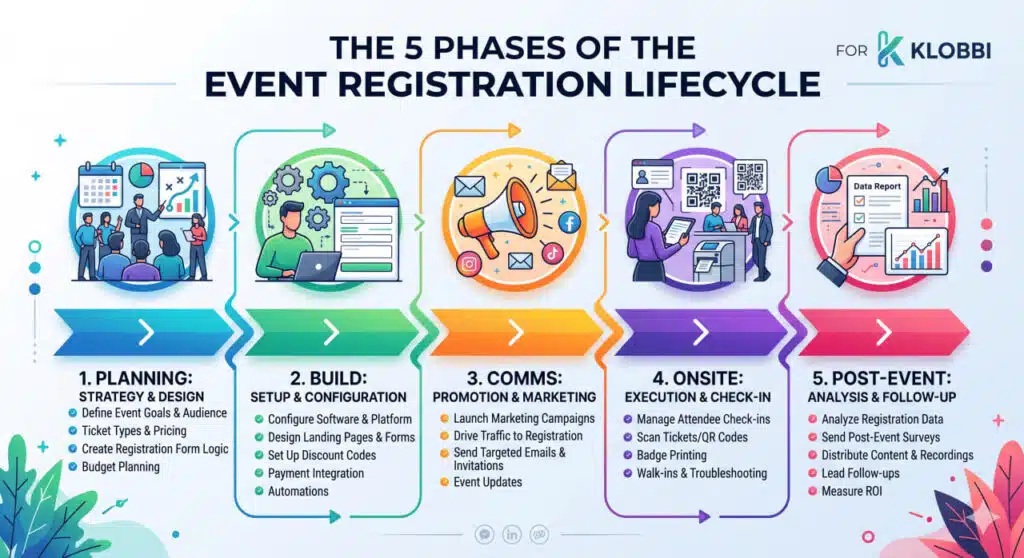
Phase 1: Pre-Launch Planning & Architecture
Before building a single form field or designing a landing page, you must architect your data and audience workflow.
Defining Attendee Tiers and Logic
Modern enterprise events have evolved past basic “General Admission” and “VIP” categories. A comprehensive registration architecture must seamlessly segregate multiple complex roles simultaneously:
-
- Paid Public Tiers: Structured across Early Bird, Standard, and Late/On-site pricing.
-
- Member vs. Non-Member Tiers: Integrated database validation for association events.
-
- Complimentary & VIP Access: Hidden or password-protected ticket types for stakeholders, ministers, and foreign dignitaries.
-
- Sponsor & Partner Allocations: Bulk ticket codes with tracking parameters to monitor sponsor asset usage.
-
- Internal Staff & Media: Distinct workflows with restricted access privileges.
-
- Sub-Event & Workshop Tracks: Capacity-capped add-ons that seamlessly tie into specialized tools like an academic online abstract submission software for research-heavy tracks.”.
Data Minimisation: Need vs. Want
Every additional field added to a registration form decreases conversion velocity. Event planners must separate “critical operational data” from “speculative marketing data.” If your logistics team does not actively use a data point to alter food orders, print badges, or route communications, delete the field from the initial form.
The Regional Compliance Mandate
In Singapore, data collection is legally bound by the Personal Data Protection Act (PDPA). Organizers must explicitly state the purpose of every data field before collection. Blanket consent boxes are illegal. Furthermore, using national identifiers like NRIC numbers for standard check-in authentication must be completely phased out by December 31, 2026. Your platform architecture must be built entirely around digital asset tokens, such as secure QR codes, to remain compliant. Failing to decouple legal consents or hoarding post-event data can lead to severe fines. Review the 11 PDPA obligations for Singapore event organizers to protect your brand.
Phase 2: Building the Form and Landing Page
Form design is an exercise in user psychology and micro-optimisation.
Core Registration Form Design Principles
-
- The 3-to-5 Field Rule: For basic corporate events, keep initial fields restricted to First Name, Last Name, Corporate Email, Company Name, and Job Title.
-
- Deploy Two-Stage Registration for Complex Events: If you require extensive data (e.g., breakout session selections, hotel room bookings, dietary restrictions), use a two-stage approach. Capture names and emails in Stage 1 to secure the registration. Send Stage 2 three weeks before the event to collect granular operational data.
-
- Use True Conditional Logic: Never overwhelm users with fields that do not apply to them. If a user selects “General Delegate,” the system must completely hide fields relating to “Speaker AV Requirements” or “Sponsor Booth Staff Allocation.”
-
- Enforce Layered Consent: Keep consent checkboxes structurally separate. One box must govern essential event operational updates, a second separate box must govern future marketing, and a third must govern sponsor data sharing. None of these boxes can be pre-ticked.
-
- Banish the Word “Spam”: Avoid phrases like “We promise never to spam you.” Psychologically, the proximity of the word “spam” to a submit button reduces form conversion rates by over 3%.
Landing Page Architecture
An event landing page must answer five foundational questions within a visitor’s first 40 seconds on the page:
-
- What is this event about?
- When and where is it happening?
-
- Why should I register?
-
- How do I register?
-
- What does it cost?

Page load speed is critically high-stakes. When promotional email campaigns or WhatsApp blasts are deployed, thousands of corporate users hit the landing page simultaneously. Enterprise platforms must utilise robust content delivery networks (CDNs) to cater for intense traffic spikes. Utilizing an all-in-one online event registration platform ensures your forms remain fast and mobile-optimised during these surges.
Ticket Tier and Scarcity Strategy
Paid events require clear pricing escalation paths (Early Bird → Standard → Last Call). For free corporate events, organisers face an average attrition rate of 40% – 50%. To mitigate this, consider implementing a small nominal commitment fee (e.g., S$10 to S$20). This nominal fee transforms the psychological profile of the ticket from a “disposable free pass” into a “financial commitment,” slashing no-show rates down to a manageable 3% to 10%. Alternately, if you are organising an event as an association, you can charge a no-show fee.
Phase 3: Pre-Event Communication & Attendance Engines
Securing a registration is only half the battle. The true operational metric of Phase 3 is the attendance rate.
The Realities of Event Attendance
-
- 68% is the average real-world attendance rate for in-person B2B corporate events.
-
- 29% of corporate delegates register on the exact same day as the event or walk in unannounced.
-
- 41.6% will fail to log in. Combating this drop-off requires a highly immersive platform; partner with an experienced Singapore virtual events company to build interactive custom spaces that keep online audiences engaged..
The 6-Touch Automated Communication Sequence
| Touchpoint | Timing | Focus Content | Core Operational Goal |
| Touch 1 | Immediate | QR code, PDF ticket, and one-click calendar add links. | Secure the date on the attendee’s corporate calendar. |
| Touch 2 | T – 7 Days | Venue logistics, parking details, MRT routing, and agenda highlights. | Build anticipation and eliminate directional anxiety. |
| Touch 3 | T – 3 Days | Breakout session reminders and networking app access. | Drive engagement and capture early session selections. |
| Touch 4 | T – 1 Day | Pre-arrival checklist, gate info, and dress code. | Finalize attendance intent and lower drop-off. |
| Touch 5 | Day of Event | Direct link to high-contrast digital QR ticket. | Accelerate throughput at the physical check-in kiosks. |
| Touch 6 | Post-Event (+4 hours) | Anonymized feedback survey and links to resources. | Capture immediate, high-accuracy sentiment data. |
To maximise arrival velocity, deploy a highly structured, automated email and message pipeline: Calendar and WhatsApp Optimisation
Embedding direct, calendar invite files or one-click calendar add links (Google Calendar, Outlook, Apple Calendar) inside the initial confirmation email is the single highest-impact action an organiser can take to reduce corporate no-shows.
In Singapore, leveraging WhatsApp notifications yields an open rate that is over 400% higher than traditional email reminders. Sending a day-before check-in reminder containing the attendee’s personalised QR code directly via WhatsApp guarantees immediate accessibility at the venue door—provided explicit opt-in consent was captured during Phase 2.
Phase 4: On-Site Check-In and Event-Day Operations
The physical registration desk acts as the literal handshake of your organization. A backup or delay here cascades frustration across your entire agenda, delaying opening keynotes and shortening networking windows.
The Peak Check-In Surge Rule
70% of your total attendees will arrive within a narrow 15-minute window.
Your on-site technical architecture must be scaled for this maximum surge capacity.
Physical Station Count Math
To prevent arrival lines, scale your hardware infrastructure exactly to your attendee volume:
-
- Under 200 Attendees: 1 to 2 check-in lanes, 1 staff member per station, and explicit floor graphics.
-
- 200 to 500 Attendees: 5 to 6 stations, a dedicated fast-track VIP lane, and a physical separation of promotional giveaway items away from the technical scanning equipment.
-
- 500 to 1,000 Attendees: 5 to 10 stations combining high-speed QR scanners and on-demand thermal badge printers. A separate, staffed “Help Desk” is mandatory to handle data exceptions.
-
- More than 10,000+ Attendees: Multiple entrance zones, staggered arrival windows, and dedicated localised network routing.
Operational Constraint: A standard badge printer and tablet stand consume 28 inches of physical depth. A standard 6ft table can fit 2 table kiosks
Check-In Methodology Performance Matrix
Data from regional enterprise event deployments shows the stark throughput differences between various intake methods:
| Method / Technology | Average Processing Time | Hourly Throughput per Station | Ideal Application |
| Manual Paper Spreadsheets | 3 to 6 minutes | ~20 – 30 pax per hour | Highly discouraged for corporate scale |
| Staffed QR Scanning App | 10 to 15 seconds | ~100 pax per hour | Standard general admission and VIP entries |
| Self-Service Kiosk Terminal | 10 to 15 seconds | ~100 pax per hour | High-volume public and exhibition tracks |
| Facial Recognition Scanners | 10 to 15 seconds | ~100 pax per hour | High-security or luxury summits |
The Power of On-Demand Badge Printing
Traditional pre-printed badge sorting introduces massive labor inefficiency. Staff waste hours alphabetizing badges into plastic trays, only to throw away roughly 30% due to no-shows. Furthermore, pre-printed badges cannot adapt to last-minute name changes or walk-in guests, resulting in unprofessional handwritten badges.
On-demand badge printing integrates directly with the check-in scan. The second an attendee presents their QR code, a compact thermal printer outputs their custom badge in under five seconds. This completely eliminates pre-sorting labor, reduces material waste by up to 60%, and allows real-time data adjustments right up to the millisecond of arrival.

On-Site Technical Guardrails
-
- Local Offline Sync Nodes: Venue Wi-Fi across major convention centers is notoriously prone to degradation when massive crowds enter a single space. If your check-in platform requires a persistent internet connection to verify tickets, your registration line will halt the moment the network dips. For such cases, Klobbi manages it with low network mode where non-critical resource intensive features are temporarily halted to prioritise the check-in experience. Klobbi also has offline capabilities where we localise the servers and no internet is required for onsite check-in.
-
- Real-Time Dashboards: Your operations command center requires instantaneous visibility into arrival metrics. A live dashboard tracking check-ins by the minute enables organisers to dynamically reallocate staff to high-traffic lanes before queues form.
Phase 5: Post-Event Data Lifecycle & Extraction
The 48 hours immediately following your event represent the absolute highest-leverage engagement window. Attendee recall is crystal clear, corporate goodwill is at its peak, and B2B leads are exceptionally warm.
The Immediate Post-Event Sequence
-
- Within 4 Hours: Deploy an automated “Thank You” email containing a direct link to an anonymised feedback survey. Keep the survey restricted to a maximum of five high-impact questions; concise surveys yield a 40% higher response rate than lengthy questionnaires.
-
- Within 24 Hours: Distribute a comprehensive resource package, including finalised speaker slide decks, keynote video recordings, and key session takeaways.
-
- Days 3 to 5: Segment your database based on event engagement metrics. Send highly engaged attendees priority access or early-bird offers for your upcoming calendar, while routing non-attendees (no-shows) to a targeted content wrap-up to maintain the relationship.
Post-Event Operational Analysis
To continually optimise future event ROI, compile and analyse seven critical metrics:
Registration-to-Attendance Rate = (Total Check-In Attendees) x (Total Registered Individuals)
Evaluate your Peak Registration Days to identify which exact marketing channels triggered the highest conversion surges (historically, sign-ups heavily cluster within the first 48 hours of invitation launch and the final 72 hours before doors open). Document the Form Abandonment Points to pinpoint which specific question caused users to exit the intake page.
Data Retention and Archiving Compliance
Post-event data cannot sit indefinitely in open-access environments. Organisers must strictly archive attendee databases with tight access controls, ensuring that personal details are not left exposed on shared team drives. Ensure your event technology platform operates on a documented data retention schedule, permanently purging personal identifying information from active operational servers on a set timeline to eliminate data breach vulnerabilities.
Klobbi deletes all attendee data from our platform within 30 days after the event ends.
The 10 Most Common Event Registration Mistakes
Avoid these critical, documented pitfalls that routinely disrupt enterprise event execution:
Mistake 1: Over-Complicating the Initial Form: Demanding extensive professional or personal profiles upfront drives immediate form abandonment. Keep fields restricted to a maximum of five baseline operational parameters.
Mistake 2: Neglecting Mobile Optimisation: A massive volume of B2B corporate registrations occur directly on smartphones. Forms that fail to scale dynamically or force extensive horizontal scrolling destroy conversion rates.
Mistake 3: Bundling Legal Consents: Combining event operations communication, company marketing opt-ins, and external sponsor data sharing into a single checkbox is a direct violation of Singapore’s PDPA frameworks.
Mistake 4: Omitting Automated Calendar Integrations: Failing to provide immediate, one-click calendar add tokens inside the confirmation email dramatically inflates your event’s no-show rate.
Mistake 5: Launching Without Comprehensive Testing: Failing to stress-test your registration form across multiple browsers, mobile operating systems, and payment gateways leads to catastrophic conversion drops on launch day. Our fully managed
Mistake 6: Neglecting the Pre-Event Reminder Cadence: Free events completely bleed attendance without a structured, multi-touch reminder pipeline. Deploy a minimum of three reminder touches before event morning.
Mistake 7: Relying on Manual On-Site Check-In: Printing physical paper attendee lists and manually striking off names guarantees massive, slow-moving lines when the morning surge hits.
Mistake 8: Deploying Pre-Sorted Alphabetical Badge Trays: Pre-printed badge setups demand hours of manual preparation, collapse under last-minute name changes, and result in disorganised entrance desks. Transitioning to self-service
Mistake 9: Failing to Build Network Redundancies: Choosing a check-in software that lacks an offline database sync mode leaves your entire event vulnerable to sudden venue Wi-Fi failures.
Mistake 10: gnoring Post-Event Data and Timelines: Delaying feedback collection or failing to clear customer data files on a secure schedule compromises both marketing ROI and data compliance safety.
The Enterprise Platform Selection Framework
When evaluating an event registration and technical check-in partner for your corporate or public sector portfolio, execute a rigorous procurement audit against this strict capabilities checklist:
Core Platform Capabilities
-
- [ ] Custom-Branded Form Logic: The software supports full visual customisation, conditional fields, multi-language mapping, and white-label custom domain embedding.
-
- [ ] Localised Payment Infrastructure: Natively handles enterprise payment gateways alongside local payment methods (PayNow), with automated localized tax invoicing (GST).
-
- [ ] Advanced Onsite Ecosystem: Integrated directly with high-speed check-in scanning technology and automated on-demand thermal badge printing hardware.
-
- [ ] True Offline Autonomy: Features full local synchronisation capabilities to process entries and drive hardware independent of venue Wi-Fi stability.
-
- [ ] Real-Time Operational Intelligence: Provides instantaneous data reporting across registrations, transaction revenue, session capacities, and onsite check-in density.
Singapore-Specific Enterprise Compliance
-
- [ ] ISO 27001 Certified: Certified to international standards for information security management systems.
-
- [ ] CSA Cyber Trust Mark Certified: Audited and verified under Singapore’s national cybersecurity framework at an advanced maturity tier, satisfying stringent enterprise and statutory board risk assessments.
-
- [ ] PDPA-Compliant Form Architecture: Built-in tools for layered consent tracking, explicit purpose notification fields, and automated marketing opt-out hooks.
-
- [ ] NRIC-Free Authentication: Built entirely around digital asset tokens and high-contrast QR codes, ensuring 2027 compliance parameters are met by default.
The Singapore Enterprise Standard
Most global software providers build tools for a generic market, treating data governance, local operational surge profiles, and regional payment ecosystems as a secondary consideration.
Klobbi was engineered from the ground up to solve the exact operational realities of Singapore’s enterprise, government, and association sector. By combining an advanced web-first registration pipeline with our high-speed Klobbi kiosks and Registration Platform, we deliver a seamless, zero-queue arrival experience backed by world-class cybersecurity credentials.
From 30-person executive boardroom dialogues to defense-grade public exhibitions with over 80,000 tickets processed, Klobbi holds the operational line under the absolute extremes of pressure.