
Home › Solutions › Abstract management software › Abstract review
Klobbi Abstract · Steps 2 and 3: review and decide
Abstract review software gives each reviewer a queue of the abstracts assigned to them and a scoring form built on the committee's criteria. In Klobbi Abstract, reviewers see only their own categories with author names hidden, and the committee sees every score as it arrives, ranked and ready for a decision.
★★★★★ Trusted by 5000+ events, including government agencies, universities and corporate conferences · ISO/IEC 27001 certified · CSA Cyber Trust mark

Figure 1. A reviewer works through their own queue of abstracts. Photo: Freepik.
Each reviewer is assigned one or more categories. Submissions in those categories go to them automatically, and everything outside them is simply not in their account. A reviewer scoring imaging abstracts never scrolls past the heart-failure submissions, and nobody gets the whole pile.
Author names and affiliations are hidden from reviewers.
Each reviewer sees their assigned abstracts, what's done, what's left and when the review window closes.
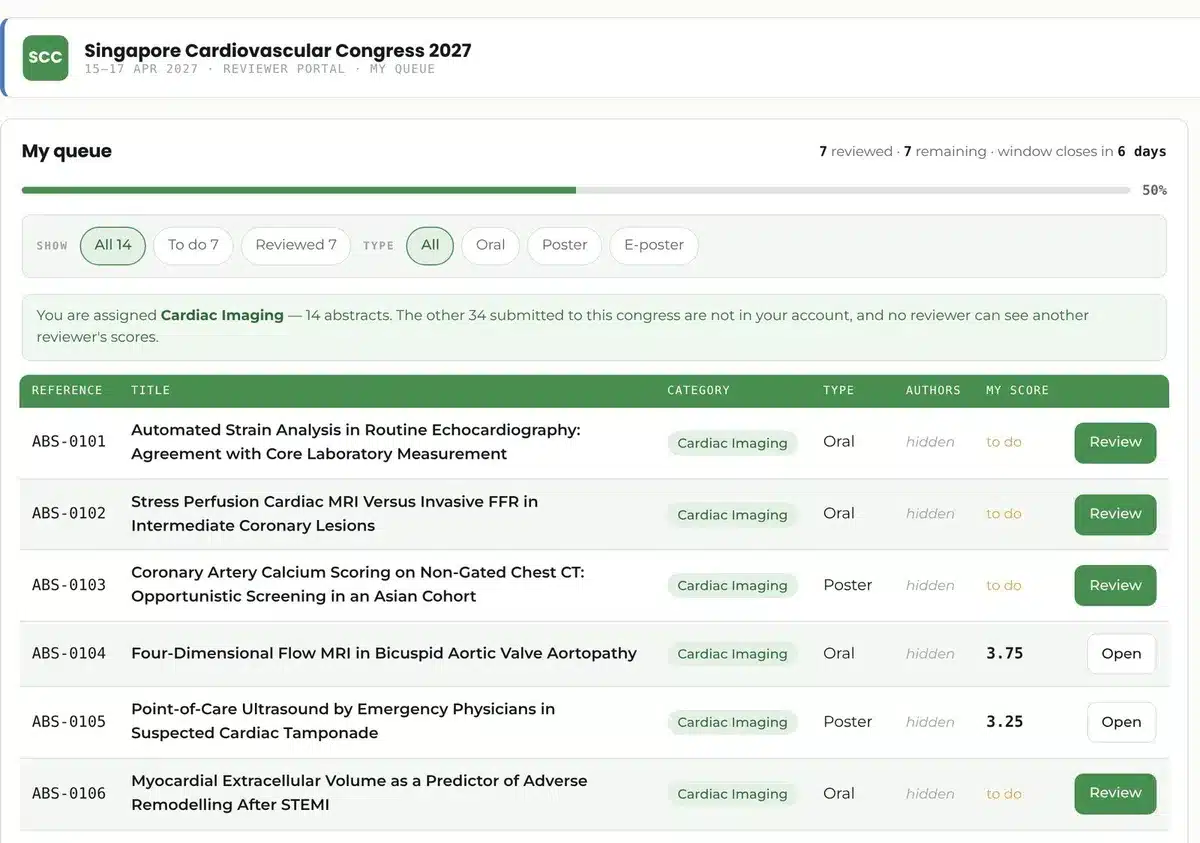
Figure 2. A reviewer's queue: one category, author names hidden. Klobbi Abstract demo with sample data.
Originality
4
Method
3
Relevance
4
Clarity
5
Figure 3. How a reviewer scores one abstract: each criterion gets a numeric score, plus a comment the author will see. Example only: your committee sets its own criteria.
Reviewers give a numeric score for each of your criteria and add a comment the author will see. Use the criteria your committee already works with.
Scores, votes and comments appear as reviewers submit them, with no collation spreadsheet.
The chair sees progress per reviewer and per category while reviews are still coming in.
Scheduled reminders go to reviewers before the review window ends.
When the reviews are in, the committee works from a ranking: every abstract with its average and each reviewer's score, in each category. Accept or decline each one. The decisions go out together, so no presenter hears before another.
Accepted presenters get a confirmation with a link back to their portal, where the presenter ticket is now open.
Declined presenters get a declination carrying the reviewers' comments.
Both email templates are yours to edit. After the decisions, accepted presenters move on to presenter management.
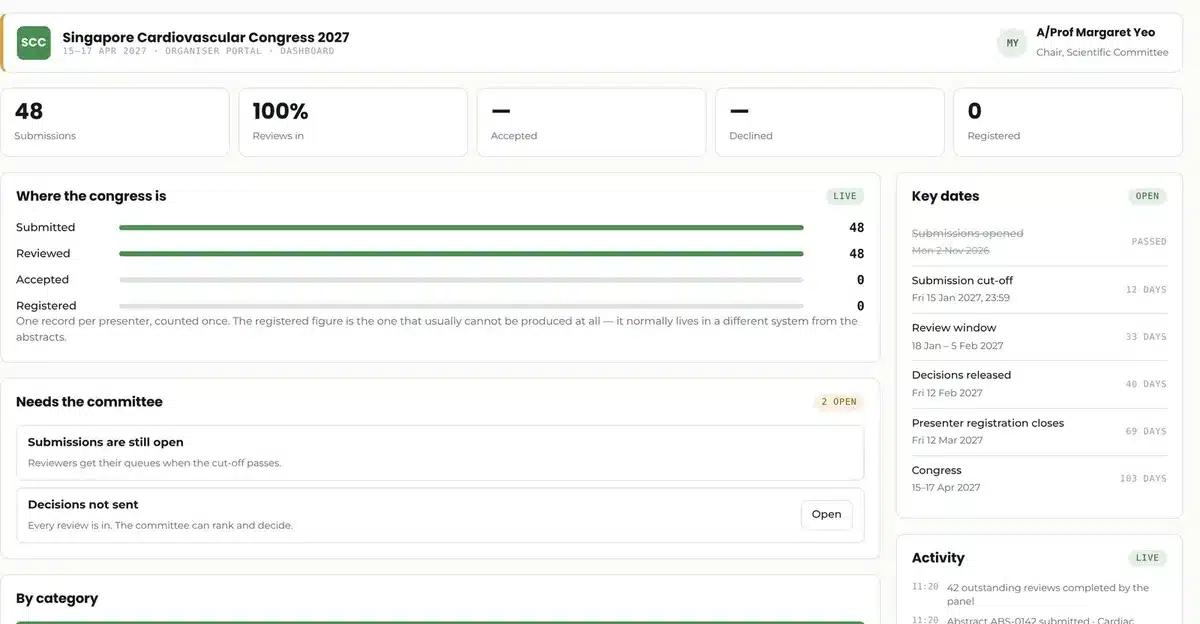
Figure 4. The committee dashboard: submissions, reviews and decisions in one view. Klobbi Abstract demo with sample data.
Committees use different review models. This is what each one means.
Review model
Reviewers know the authors
Authors know the reviewers
Single-blind
Yes
No
Double-blind
No
No
Open review
Yes
Yes
In Klobbi Abstract, author names and affiliations are hidden from reviewers. Tell us which model your committee uses and we'll confirm the set-up before your call opens.
Can we use our own scoring criteria?
Yes. Reviewers give a numeric score for each of your committee's criteria, plus a comment the author will see.
Do authors see the reviewers' comments?
Declined presenters receive a declination email carrying the reviewers' comments, so reviewers write their comments for the author.
The whole workflow on one page, from call for abstracts to presenter badge.
Read more →The submission form, the presenter portal and the cut-off.
Read more →From acceptance email to presenter badge.
Read more →Search, e-posters, votes and viewing reports.
Read more →Send us your categories, the number of reviewers and the criteria your committee uses. We'll show you the reviewer queue and the committee ranking on a call, and reply with a quote within one working day.
WhatsApp +65 8836 2597 Email sales@klobbi.com