
Home › Solutions › Abstract management software › Abstract submission portal
Klobbi Abstract · Step 1: submit
An abstract submission portal is where presenting authors send their abstracts to a congress, follow their status and make changes before the deadline. Klobbi's portal is built for each event, with your categories, word limit, author fields and presentation types, and it keeps every submission as one record from first draft to presenter badge.
★★★★★ Trusted by 5000+ events, including government agencies, universities and corporate conferences · ISO/IEC 27001 certified · CSA Cyber Trust mark

Figure 1. A presenting author at a congress session. Photo: Freepik.
Every congress asks for something slightly different, so the form is set up per event. These are the parts most calls for abstracts need.
The category, or track, decides which reviewers receive the abstract. The word limit is enforced as the author types.
The presenting author plus the full author list, captured once.
Oral, poster or e-poster.
PDF, poster and image uploads alongside the text abstract.
Tick boxes you define, such as consent, originality and co-author approval.
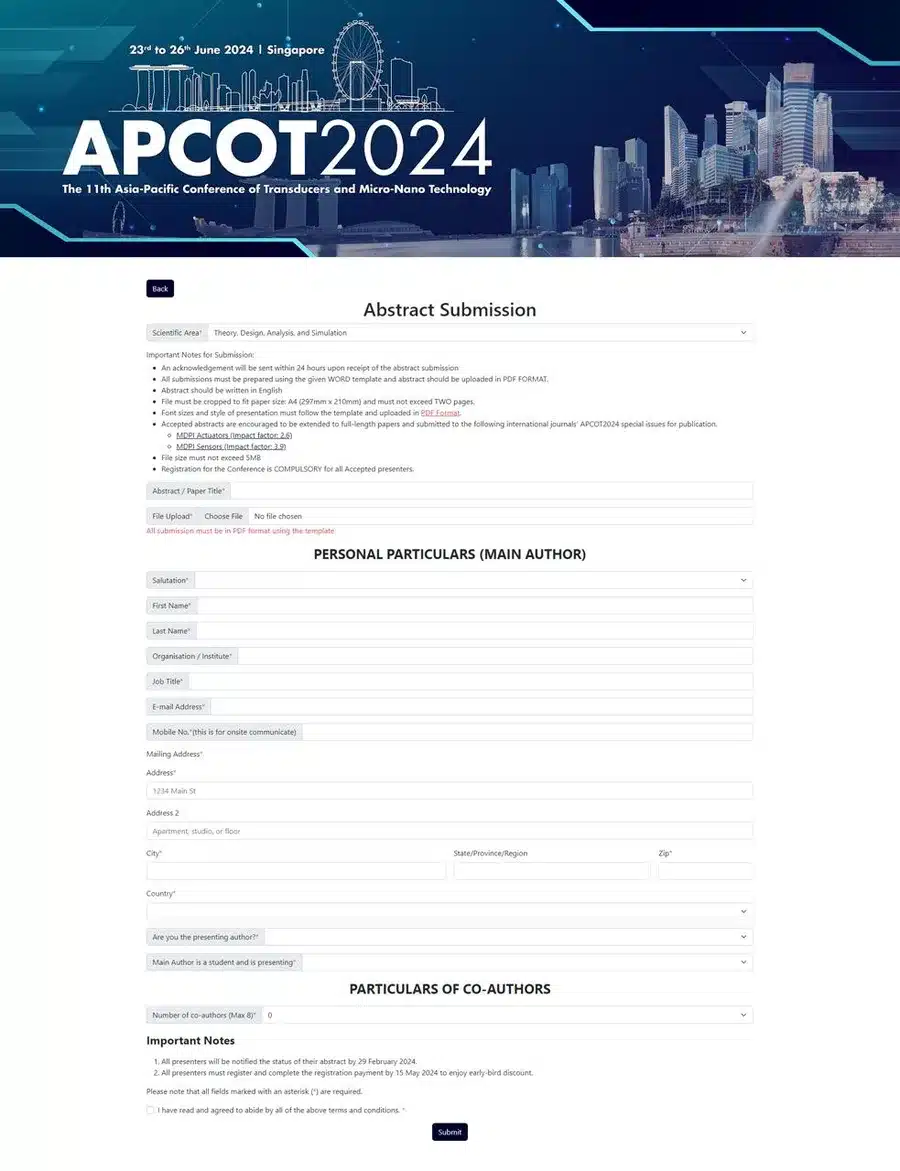
Figure 2. The abstract submission form Klobbi built for APCOT 2024: scientific area, title, PDF upload, main author and co-authors.
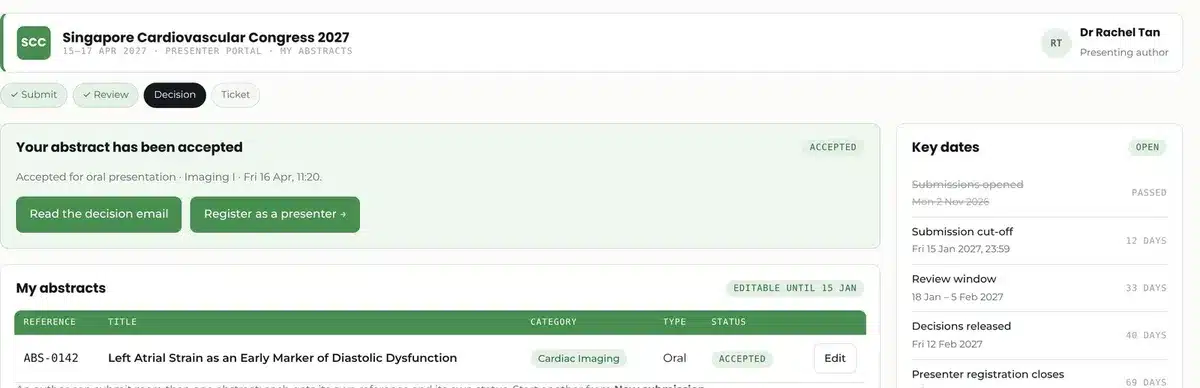
Figure 3. The presenter portal: each abstract with its status, and the next step after the decision. Demo data.
Every presenter gets their own login. When something changes, they don't email a new version; they open the portal and edit the record.
Presenters log in, edit and update their submissions until the cut-off date. After that, the record is locked for review.
Drafts and submitted abstracts side by side, each with its own status.
Cut-off, review window, decision date and presenter registration, on the same screen as the submissions.
A reference number and a confirmation email as soon as an abstract is in.
Scheduled emails remind presenters who still have drafts open before the call closes.
A clear call for abstracts starts with a few decisions. These are the questions your project manager goes through with you before the portal opens.
The dates belong to your congress. This is what happens at each one in Klobbi Abstract.
Date
What happens
In Klobbi Abstract
Call opens
Authors start submitting
The portal goes live with your form, categories and dates
Before the cut-off
Authors finish and revise
Presenters edit their own records; reminders go to anyone with a draft
Cut-off
Submissions close
Records lock and go to reviewers by category
Review window
The committee reviews
Reviewers score blind in their own queues; the chair follows progress live
Decision date
Results go out
Confirmation and declination emails go out together
Presenter registration
Accepted authors register
Presenter tickets open in the same portal, details already filled
Congress days
Presenters arrive
QR check-in and a printed presenter badge
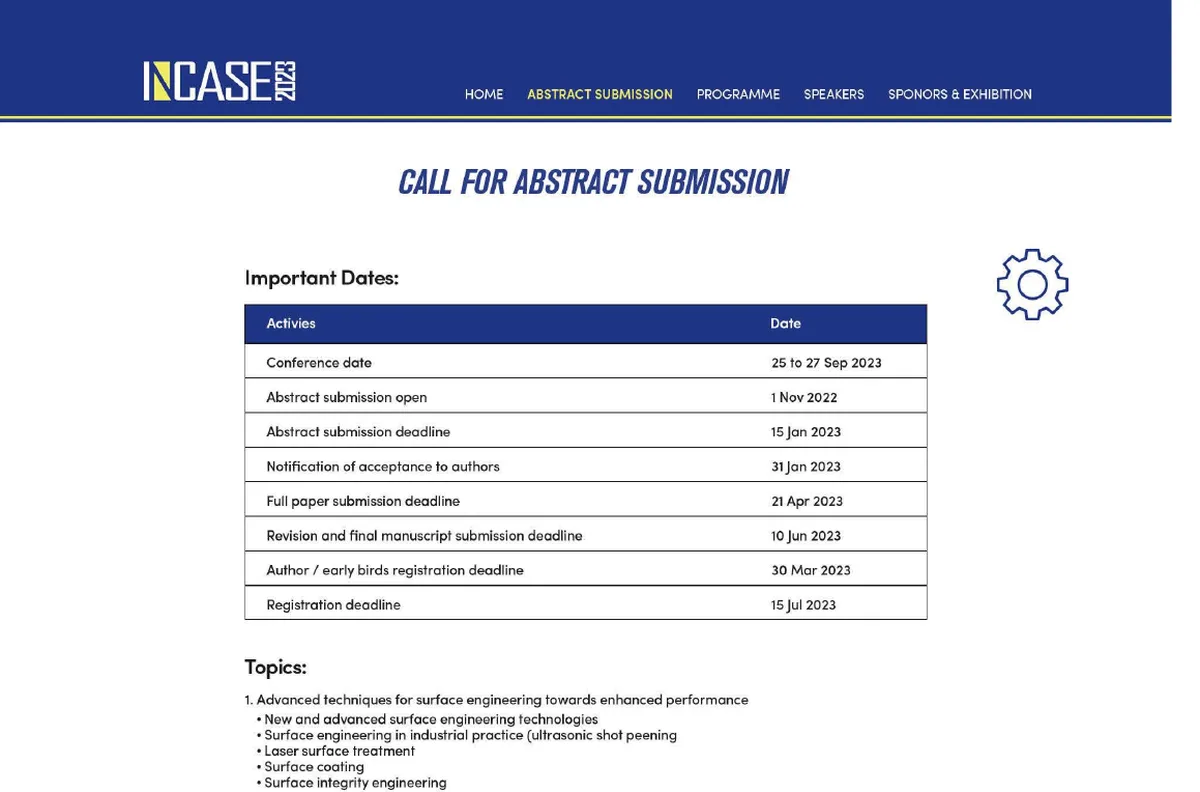
Figure 4. In use
The call for abstracts page Klobbi ran for INCASE 2023 set out the same dates for authors: submission open, deadline, notification of acceptance, full paper and registration.
Can authors edit an abstract after submitting it?
Yes, until the cut-off date. After the cut-off the record is locked, so reviewers score the final version.
Does submitting an abstract mean it has been accepted?
No. Submission puts the abstract into review. The presenter hears the outcome when the committee sends its decisions, and only accepted authors see the presenter ticket.
Do authors have to register for the congress before they submit?
Not in the standard set-up. Authors submit first, and only those accepted are offered the presenter ticket. Everyone else registers as a delegate in the usual way.
Reviewers by category, blind scoring and committee decisions.
Read more →From acceptance email to presenter badge.
Read more →Search, e-posters, votes and viewing reports.
Read more →The whole workflow on one page, from call for abstracts to presenter badge.
Read more →Guide: how abstract submission software works, the seven stages of a call for abstracts from the first announcement to presenter registration.
Send us your congress dates, categories and the number of abstracts you expect. We'll walk you through the submission form and the presenter portal on a call, and reply with a quote within one working day.
WhatsApp +65 8836 2597 Email sales@klobbi.com