
Klobbi EventApp
Home › Solutions › Event apps › Audience engagement
Event Q&A · live polling
Conference audience engagement means giving every person in the room a way to take part from their phone. Klobbi EventApp does this with event Q&A, where attendees ask and upvote questions, and event live polling, where they vote and see the result. Both run inside the event app or on their own from a QR code.
ISO/IEC 27001 certified · CSA Cyber Trust mark · Singapore team since 2018
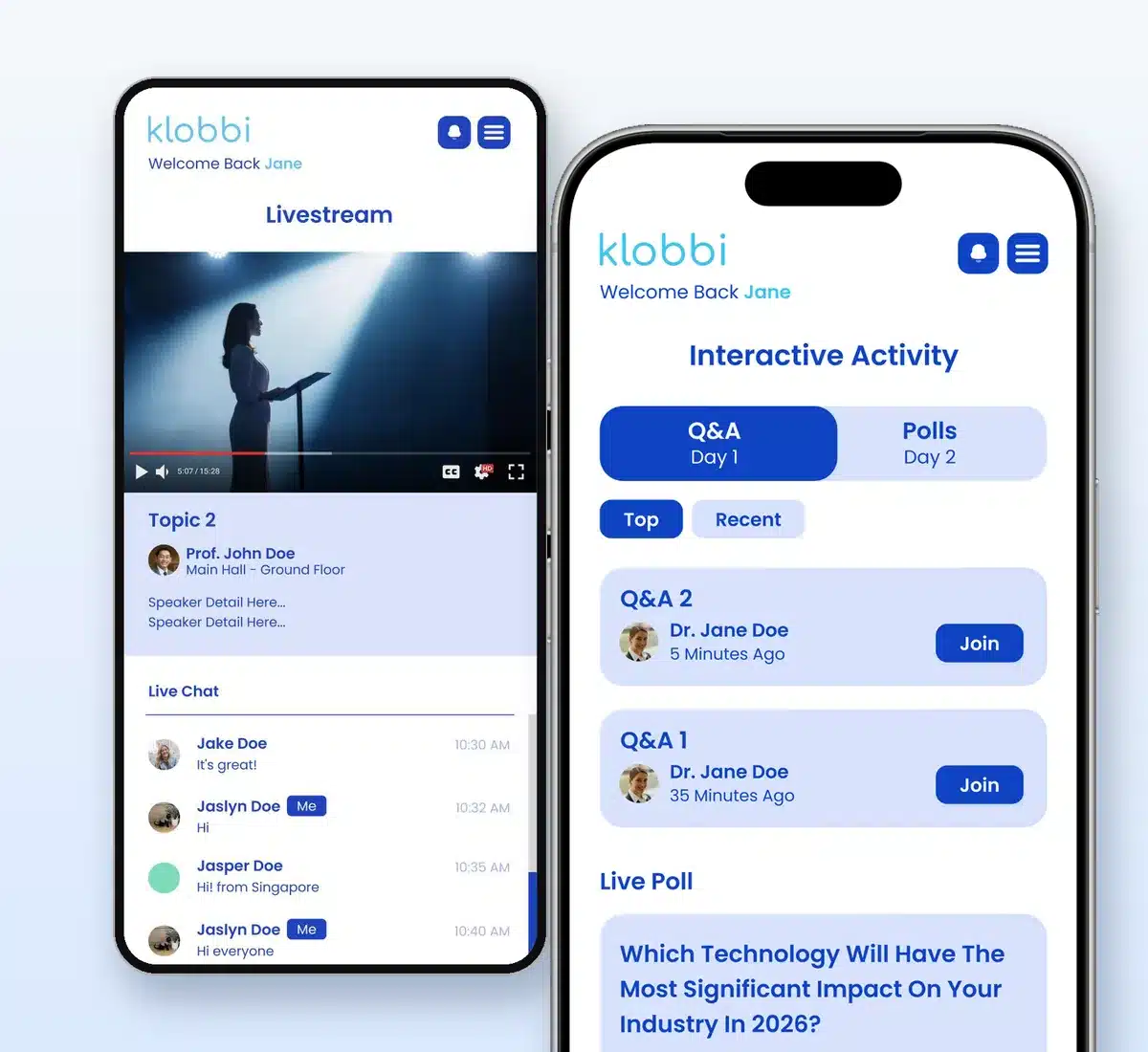
Sample session with live stream, Q&A and polls in EventApp.
It is everything that turns an audience from listeners into participants during a session: asking questions, voting, reacting. At a conference the room is large and the microphone reaches three people. A phone in every hand reaches all of them.
1. Attendees open the session in EventApp Mobile, EventApp Web, or by scanning a QR code on the screen.
2. They type a question, with their name or anonymously.
3. The room upvotes. The questions most people want answered rise to the top.
4. The moderator approves each question before it shows, and picks which go to the speaker.
5. The speaker answers the questions the room chose, and the quiet attendee gets the same chance as the confident one.
The organiser prepares the polls before the session. When the speaker reaches one, attendees vote on their phones and the result builds on the venue screen as votes arrive.
Use a poll to open a session, to test what the room believes before a panel, or to let delegates choose between two directions for the last ten minutes.
Single choice
One answer from a list.
Multiple choice
Every answer that applies.
Rating
A score, such as one to five.
Word cloud
Short answers that grow as more people give them.
Q&A and polls are the core. These run from the same event app, so the audience stays in one place.
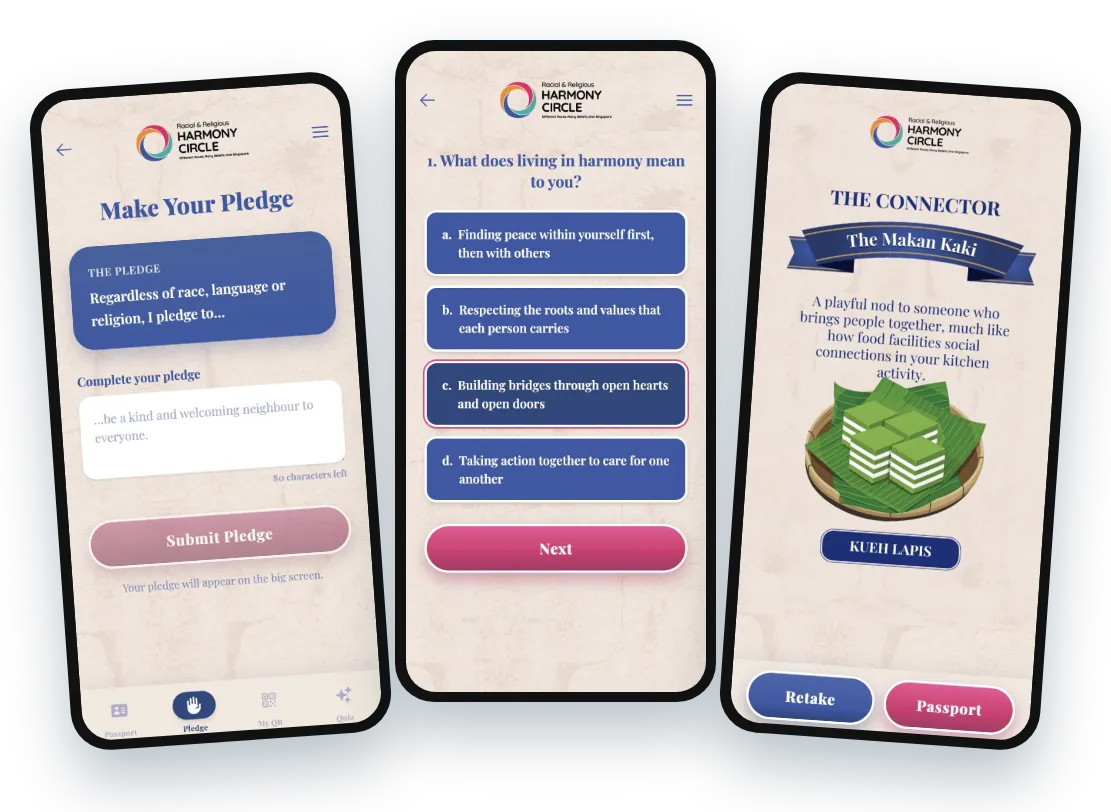
• Pledge or message wall: guests write on their phone and it appears on the LED wall as it comes in
• Run it on auto-publish, moderated or closed, and switch live
• Personality quiz: a few questions and a result card guests want to share
• Both can count as stations in the digital event passport
• Ran at Harmony Fest 2026, with thousands of pledges on the wall
• Live stream in the app, for people outside the room
• Live chat and emojis beside the player
• AI transcription, live translation and an instant summary with Klobbi Oracle
• Poster voting for scientific congresses: browse, search and vote for the best poster
• Games with a leaderboard between sessions, for virtual and hybrid events
No. Q&A and polling are plug-and-play parts of Klobbi EventApp.
Table 3. Three ways to run Q&A and polling.
You have
How attendees take part
Inside the session page of the app they downloaded
Inside the session page that opened from their link
No event app
Scan a QR code on the screen and take part in the browser
Every question and every poll result can be exported to Excel after the session, for your event report and the speaker's follow-up.
Add Klobbi Oracle when the session also needs live captions, translation or an AI recap of what was said. EventApp's Q&A and polling cover taking part; Oracle covers understanding and remembering. Oracle has its own pages for live Q&A and live polling run with captions.
The moderator takes the top-voted questions.
Staff ask what they would not ask at a microphone.
Delegates vote on a case before the answer is shown.
A poll splits the room into groups by interest.
Questions and votes are hosted in Singapore and deleted 30 days after the event. Klobbi is ISO/IEC 27001 certified, holds the CSA Cyber Trust mark and works to Singapore's PDPA.
Send us your dates, the number of sessions and whether you already have an event app. We'll reply within one working day.
WhatsApp us Email sales@klobbi.comWhat is the best way to run audience Q&A at a conference?
Let attendees submit questions from their phones and upvote each other's, then have a moderator put the top questions to the speaker. It gives the whole room a voice and keeps the session to time.
Do attendees need to download an app to ask questions or vote?
No. With EventApp Web or a QR code they take part in the phone's browser. With EventApp Mobile they use the app they already have.
Can event Q&A and live polling run without the full event app?
Yes. Attendees scan a QR code on the screen and take part in their browser, with no event app.
Can questions be anonymous?
Yes. Attendees can ask with their name or anonymously, and the moderator still approves each question before it shows.
Can poll results be shown on the main screen?
Yes. Poll results and approved questions can be shown on the venue screen as they come in.
How is this different from Klobbi Oracle?
EventApp's Q&A and polling are features of the event app. Klobbi Oracle is a separate product that adds live captions, translation and an AI recap, with its own Q&A and polls.