
An exhibition can involve different registration journeys for visitors, trade buyers and exhibitor personnel. Information captured before opening day must also be practical for check-in, entry credentials and onsite teams.
Klobbi’s exhibition registration system connects attendee records with the wider event workflow. Depending on your requirements, the setup can cover branded registration pages, attendee categories, ticketing, confirmations, QR credentials, onsite check-in and badge printing. Our team can also support configuration and event-day technology deployment.
The configuration begins with audience categories, required information and how people will be admitted at the venue.
Not everyone attending an exhibition follows the same journey. A trade buyer may need to provide company details, a public visitor may only need a straightforward ticket, and a booth representative may need a badge showing their exhibitor category.
Klobbi can configure attendee categories and registration fields around those differences, so the information collected supports the actual event operation.
Create a clear registration path for members of the public, professionals or invited visitors. Collect relevant details, confirm attendance and prepare QR credentials or ticket information where required.
For B2B exhibitions, registration may include organisation, designation, industry and other information that helps organisers identify the audience. Fields should be selected for a genuine operational purpose rather than collected by default.
Exhibitor staff can be represented through appropriate registration categories, with relevant company or role details where configured. This is different from a full exhibitor-company management portal or booth allocation system, which should be separately scoped.
Where an exhibition includes VIP guests, speakers, organisers or onsite personnel, their registration fields and credential requirements can be planned as part of the overall attendee-category structure.
These are examples of possible registration audiences. The right categories depend on the particular exhibition.
Present a registration experience aligned with your exhibition branding. The registration form can be structured around your event categories and the details needed for confirmation, visitor administration or onsite operations.
Different audiences do not always need identical questions. Klobbi can configure attendee categories, custom fields and relevant registration logic so the organiser receives more usable information.
For ticketed exhibitions, registration and ticket details can remain connected rather than being managed through separate files. Where paid admission is required, Klobbi’s registration and payment workflow can support the payment options agreed for the event.
After registration, attendees can receive relevant confirmation details and QR credentials according to the event setup. These give the onsite registration team a defined way to identify a registration when an attendee arrives.
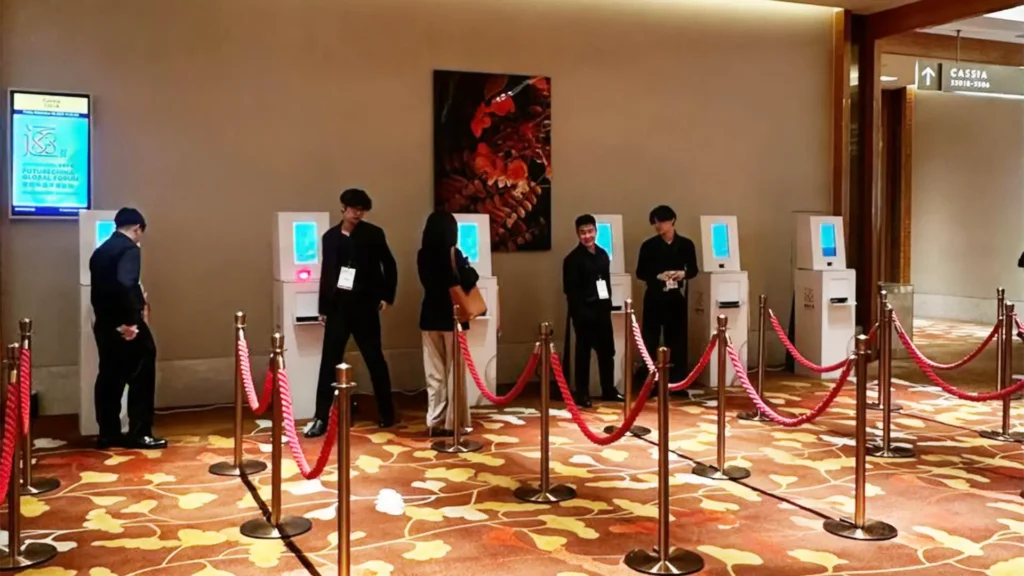
At the venue, configured QR scanning and attendee lookup can connect arrival to the registration record. Depending on the deployment, organisers may use staffed registration desks, self-service kiosks or a combination of check-in methods.
For exhibitions that require physical badges, attendee information can feed into configured badge templates and onsite printing. Name, company, designation or category can appear where those fields have been collected and approved for the badge layout.
Registration figures and onsite attendance should be understood as different measures. Connected registration and check-in records help event teams distinguish people who signed up from those recorded as having arrived, within the reporting configuration agreed for the project.
Klobbi is more than a self-service form provider. Our team can work with the organiser on registration configuration, deployment planning and onsite technical or registration support where included in the project.
We begin with the exhibition format, event dates, expected visitor profile and the categories that need registration. We also identify whether the exhibition is free, ticketed, invite-only or a combination, and whether different groups need separate arrival arrangements.
Klobbi prepares the registration structure, relevant form fields, attendee categories, branding and confirmation requirements. Any ticket or payment configuration is planned around the actual entry model rather than assumed for every exhibition.
Before launch, the project team checks the attendee-facing journey, including confirmation information and any QR or ticket credentials. The goal is for the details collected online to support the next part of the experience rather than sit in a disconnected spreadsheet.
For exhibitions using Klobbi’s onsite solutions, the registration records can continue into QR scanning, attendee lookup and the agreed staffed or kiosk-based check-in arrangement. The team also plans how to handle practical exceptions such as missing QR codes, details requiring correction or visitors registering onsite.
Where physical credentials are required, configured onsite printing can use the attendee data prepared earlier. Registration and check-in information can then support agreed attendance reporting and post-event handover.
Each step is configured around the exhibition’s requirements. Not every event needs ticket payments, kiosks or printed badges.
A visitor may complete registration days before the exhibition but still face a queue if the arrival process relies on a separate spreadsheet, a manual name search or badge details that were never checked in advance.
Klobbi can plan QR verification, attendee lookup and badge printing around the fields already captured during registration, reducing avoidable manual re-entry at the venue.
Our onsite event registration and check-in technology can support QR scanning, attendee lookup and configured kiosk or staffed workflows. For events issuing physical passes, the same attendee information can also continue into on-demand event badge printing, rather than requiring the registration desk to recreate each visitor’s badge.
A practical arrival plan should also account for peak arrival windows, registration counters, expected walk-ins and venue connectivity. The right mix of software, equipment and staff depends on the exhibition’s layout and visitor flow.
Register professional visitors, trade buyers, exhibitors’ staff and other authorised categories through an event-specific process. Where required, capture relevant organisation and industry details while keeping onsite check-in connected to the original registration.
Support a straightforward public visitor journey with clear registration information, confirmations and ticket or QR credentials. Where entry is free, the registration experience need not introduce payment steps.
If an exhibition accompanies a conference, the registration plan should distinguish exhibition-only visitors from conference delegates, including any differences in passes or session access.
Where organisers need to manage different participating groups, registration categories and clearly defined attendee information help keep the experience organised. The exact fields and access setup depend on the event’s audience and operational requirements.

For LKY100 “Now Is Not The Time”, an exhibition celebrating Lee Kuan Yew’s life and legacy, Klobbi supported the online registration and ticketing experience for a diverse public audience.
The registration system was prepared and launched within a tight two-week project timeline. This was a specific project outcome, not a standard setup guarantee.
The example shows why implementation support matters. An exhibition organiser may need more than a registration form: visitor-facing pages, ticketing, confirmations and a reliable operational handoff all have to be considered within the same project.
If you are planning an exhibition with a fixed opening date, our team can review the scope, configuration requirements and delivery schedule with you.
Klobbi combines configurable registration software with related check-in and badge-printing technology. That allows the event setup to consider both online sign-ups and what will happen at the entrance.
Our team can assist with configuration and deployment planning, with project and onsite support agreed according to the scope. Organisers do not have to treat event-day registration as an entirely separate technology project.
Klobbi works with event organisers and enterprise teams in Singapore, helping align registration requirements, onsite equipment and operational support with the local event environment.
Klobbi Pte Ltd’s information security management system is certified to ISO/IEC 27001:2022, and the company holds Singapore’s CSA Cyber Trust Mark at Promoter tier. Klobbi also structures registration workflows around Singapore’s PDPA requirements.
The right registration setup depends less on how many form fields a platform can display and more on the decisions the organiser needs to make.
Who is registering? Do general visitors, professional buyers, booth personnel and VIPs need different questions or confirmation information?
Will admission be free or paid? Do visitors need to select a date or pass category? Will some groups be invited or registered through separate processes?
Will the venue use staffed desks, self-service kiosks or both? How will the team locate a registration if a visitor cannot show their QR code? What should happen for walk-ins and corrections?
Does the exhibition need printed name badges or another physical credential? Which information should appear, and should different attendee categories have different layouts?
Which information is genuinely required, who will use it, and how will attendee records be handled after the exhibition? Registration totals and actual check-in counts should have clear meanings.
What equipment and staff will be needed at the venue? What is the network environment, and which workflows must be tested before opening day?
Klobbi can discuss these requirements during the project scoping process and recommend a suitable registration and onsite setup.
An exhibition registration system is software used to collect and organise registrations for a trade show, public exhibition or similar event. Depending on the setup, it may also connect attendee categories, tickets, confirmations, QR check-in, badges and attendance reporting.
Yes. Klobbi provides event registration and ticketing technology that can be configured for exhibitions, together with project implementation and relevant onsite technical support. Klobbi is an event-technology provider, not a company that plans or produces the entire exhibition.
Yes. Klobbi can provide branded online registration forms that collect the appropriate visitor information and issue configured confirmation details. The fields and entry process depend on the exhibition’s requirements.
Yes. Klobbi supports configurable attendee categories, so an exhibition can distinguish relevant visitor and exhibitor personnel information. A dedicated exhibitor self-service portal, company-level management module or booth allocation workflow is a separate requirement that should be discussed and confirmed during scoping.
Yes. QR-code credentials and compatible onsite check-in are part of Klobbi’s event technology offering. The particular scanning stations, registration desks and arrival procedures are configured for the event.
Yes. Klobbi offers onsite event badge-printing solutions that can use attendee data and configured badge templates. Badge stock, printer arrangements, check-in stations and onsite support depend on the agreed setup.
Klobbi supports event registration as well as online registration and payment workflows where required. An exhibition with free entry need not use payment steps; ticketing and payment arrangements are planned around the actual admission model.
Where an exhibition runs alongside a conference, attendee categories, passes and onsite requirements can be planned together. More complex delegate and conference workflows are addressed through Klobbi’s conference registration system.
Klobbi can provide event-day technical and registration support as part of the agreed project scope. Requirements such as registration counter setup, equipment, support crew and operating hours should be discussed before the event.
Pricing depends on factors such as event duration, the registration and ticketing model, the number and type of attendee groups, configuration needs, onsite stations, badge printing and technical support. Contact Klobbi with your exhibition requirements for a scoped proposal.