
A simple signup form works until an event has multiple attendee categories, different information requirements, paid and unpaid registrations, group bookings, special access needs, or hundreds of people arriving within the same window. That is where disconnected forms, spreadsheets and manual updates start creating work for the organiser and friction for the attendee.
An attendee registration system is the software and workflow used to collect, organise and manage attendee information before an event, then connect each registration record to confirmations, credentials, onsite check-in and attendance reporting.
Klobbi takes that a step further by combining the platform with managed implementation. Instead of handing your team a blank form builder, we work through who is registering, what information each group needs to provide, how confirmations should work, what happens at the venue, and what data your team needs after the event.
A strong attendee registration workflow adapts to the attendee rather than asking every person the same questions. Klobbi’s registration platform supports customised fields, registration categories and different attendee types, so organisers can collect the information that is relevant to each event and each group.
A conference delegate may need to provide an organisation, job title, dietary requirements and session preferences. A VIP guest may need a different set of details. Staff, speakers, participants or members of the public may each have their own registration requirements.
Klobbi can structure branded registration forms around these differences, helping reduce unnecessary questions while keeping the information organisers need in one organised registration workflow.
This is especially useful when a registration form needs more than basic contact details. Custom fields can be used for information such as organisation, designation, dietary requirements, accessibility needs, event preferences or other event-specific data.
Different attendee categories can be used to organise how people register and how their records are handled later. Your event might distinguish between delegates, invited guests, staff, speakers, VIPs, public attendees or other participant groups.
Klobbi also supports ticket types and event-specific registration configurations, including paid registration where required. The objective is not to create complexity for its own sake; it is to make sure the registration path reflects how the event actually operates.
For conferences and programmes where one contact needs to register several people, the registration workflow can include group-booking requirements rather than forcing the organiser to manage a separate spreadsheet beside the system.
The exact setup should follow the event’s rules: whether each attendee needs an individual record, which details are required for each person, how payment is handled, and how confirmations or QR credentials are issued. That planning matters because group registration affects everything that follows, from attendee communication to check-in and badges.
Once a registration is submitted, the attendee should immediately know what happens next. Klobbi supports automated confirmation emails and QR-code credentials so attendees have a clear record of their registration and a fast way to identify themselves when they arrive.
Event teams can also use the platform for automated notifications and reminders, helping keep pre-event communication tied to the registration process instead of managing confirmations manually across separate tools.
An online attendee registration system should not stop working the moment someone clicks Submit. The registration data collected before the event becomes far more useful when it continues into the operational stages that follow.
With Klobbi, attendee information can move through the same event workflow from online registration to confirmation, QR ticketing, onsite check-in, badge printing and attendance reporting. That reduces repeated data entry and gives the event team a clearer view of who registered and who actually arrived.
If you already have an attendee list, Klobbi can also work with imported registration data. The team can help clean and organise lists that contain duplicates, inconsistent formatting or multiple versions before they are used for event operations.
Attendees complete the relevant online form and receive an automated confirmation with their event details and QR credential.
The organiser can monitor registrations and attendee information through the event registration system instead of relying on separate spreadsheets for every stage.
At the venue, QR scanning and attendee lookup connect the person arriving at the door with the registration record created before the event.
Where badges are required, attendee information can be used for on-demand badge printing at check-in. Attendance status then gives the organiser a real-time picture of arrivals during the event and useful reporting afterwards.
An audience registration system applies the same core registration discipline to public programmes, large visitor groups and events where a high number of people may register or arrive within a short period. The challenge is not only collecting names; it is keeping registration, credentials and event-day entry manageable as volume increases.
For public-facing events, the registration experience should be easy to complete on mobile, clear about what information is required, and capable of issuing a usable confirmation or QR credential without creating extra manual work for the organiser.
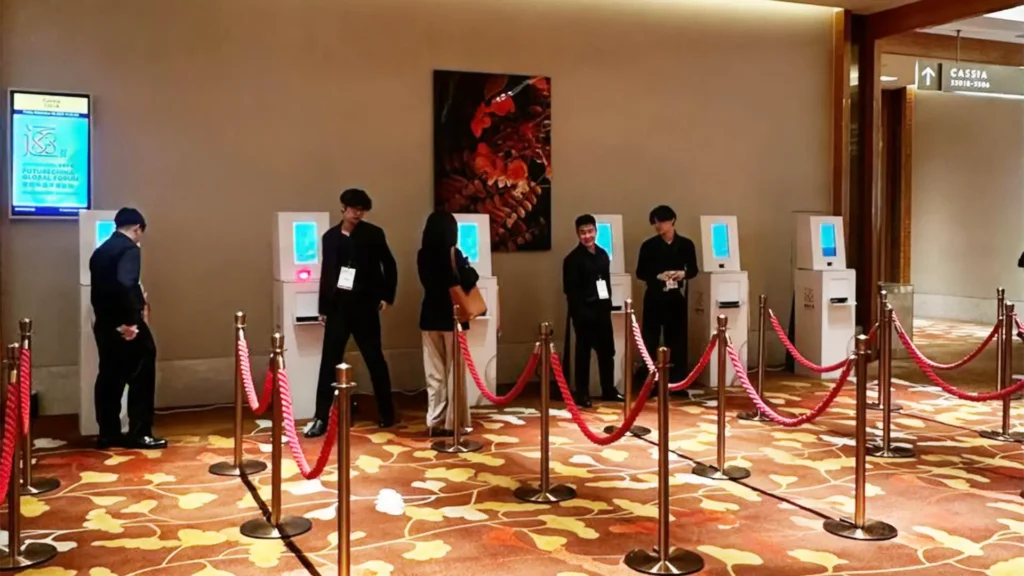
Klobbi combines online audience registration with the event-day tools needed to handle the next stage. QR check-in, attendee lookup, walk-in handling, on-demand badges where required and live attendance data help the registration team keep the entrance moving while maintaining accurate records.
This model is relevant to public programmes, sports and community events, exhibitions, large activations and other events where organisers need both an audience-facing signup experience and a reliable operational handoff at the venue.
Different event formats use different words for the people attending. “Attendee”, “audience member”, “delegate”, “participant” and “guest” often describe overlapping registration needs, but the information and workflow behind each role can be different.
Delegate registration may require company details, job title, dietary or accessibility information, ticket type and session preferences. For larger conferences, the attendee-registration layer should connect cleanly with conference-specific requirements without turning the registration form into a maze.
For conferences with multiple delegate categories, pass types or session choices, the attendee record can continue into Klobbi’s conference registration system without forcing organisers to rebuild the same data in a separate workflow.
Corporate events may include employees, clients, partners, invited guests and VIPs. The registration workflow can be designed around the information the organiser needs to identify and support each group, while keeping the attendee experience straightforward.
Public events need a fast, mobile-friendly registration path that can handle volume without sacrificing data quality. Clear categories, automated confirmations and QR credentials make the online-to-onsite transition easier to manage.
VIPs, speakers and event staff may require different fields or handling from general attendees. Treating them as defined attendee types allows the event team to collect the right information without asking every registrant irrelevant questions.
The strongest registration workflow is the one that still makes sense when the attendee reaches the venue. Klobbi connects registration with the adjacent systems that event teams commonly need instead of forcing organisers to rebuild the same attendee information in separate tools.
For paid events, Klobbi supports online registration and payment in the same workflow. Supported methods include major credit cards as well as PayNow, Alipay, WeChat Pay and PayPal, helping organisers serve both local and international attendees.
Payment belongs inside the attendee journey, but it should not make the registration experience confusing. The form, ticket or registration type, payment status and confirmation should work together so the organiser can see what has happened without manually reconciling multiple systems.
Automated QR confirmations give attendees a fast credential for event-day check-in. Klobbi’s onsite workflow supports QR scanning, attendee lookup and walk-in handling, with live attendance updates available while the event is running.
Venue connectivity is not always perfect. Klobbi’s current onsite workflow is designed to keep check-in operating when venue Wi-Fi drops and synchronise data when the connection returns, helping the registration desk avoid becoming the event’s first bottleneck.
Where an event needs physical identification, the attendee record can continue into on-demand badge printing. Instead of pre-printing every badge and alphabetising stacks before the doors open, badges can be produced when the attendee checks in.
When onsite badges are required, the same attendee record can continue into Klobbi’s event badge printing solution, so names, categories and other approved fields do not need to be rebuilt in a separate print file.
Klobbi also brings spare printers for event-day operations, reducing the risk that one hardware issue stops the whole registration desk.
The software matters, but the way the registration workflow is designed matters just as much. Klobbi combines its platform with a managed delivery process so organisers are not left to work out every rule alone.
We start with the event rather than the form. Who is registering? Which attendee categories exist? What information is required from each group? Is registration paid or free? Does the event need QR check-in, badges, session preferences, imported lists or business-system integrations?
These decisions define the workflow before design begins.
Klobbi configures the registration page, forms, custom fields, registration types, branding, confirmations and related event requirements. The goal is a registration experience that is clear on mobile and practical for the team managing the event.
A registration form should be tested the way real attendees will use it. Different attendee types, payments where applicable, confirmation emails, QR credentials and the onsite handoff should be checked before launch rather than discovered at the registration desk.
Once registration is live, the event team can monitor attendee data and registration activity while Klobbi’s project team supports the configured workflow. Automated confirmations and notifications reduce the amount of repetitive manual follow-up required.
For events using Klobbi’s onsite services, the project does not end when online registration closes. QR check-in, attendee lookup, walk-ins, badge printing and live attendance become the event-day continuation of the registration process.
After the event, registration and attendance data can be used for reporting and follow-up instead of rebuilding the picture from separate lists.
Attendee registration involves personal data, so the system has to do more than collect information quickly. Event organisers need to know what is being collected, how it is used during the event, who can work with it, and what they can report afterwards.
Klobbi’s registration platform gives organisers visibility into registration and attendance data and supports event reporting and data export. Where business-system connections are required, Klobbi also supports CRM, SSO and other integrations based on the project requirements.
For information security, Klobbi states that attendee data is encrypted in transit and at rest and that data-handling and residency arrangements can be documented for procurement teams or DPOs. Klobbi Pte Ltd’s information security management system is certified to ISO/IEC 27001:2022, and the company also holds the CSA Cyber Trust Mark at Promoter tier.
Klobbi’s registration processes are designed around Singapore’s PDPA requirements. For organisations with formal procurement or security review, the deeper technical discussion should happen during scoping so the exact data flow, access requirements, integrations and event-specific controls are documented before launch.
For organisations with formal procurement or security review, Klobbi’s event registration data security guidance provides deeper context around controls, credentials and event-specific data handling.
A basic online form may be perfectly adequate when an event has one attendee type, a handful of fields, no payment, no special communication logic and no connection to onsite operations.
A managed attendee registration system becomes more valuable when the registration has to support multiple attendee categories, custom information, group bookings, paid registration, QR credentials, event-day check-in, badges, high arrival volume, imported data, reporting or integrations.
The difference is not simply “more features”. It is whether the registration data is designed to keep working as the attendee moves from signup to arrival.
With a basic form, the organiser often has to create the process around the tool. With Klobbi, the registration process is designed around the event and then carried through the technology and the team running it.
When teams need to understand how forms, attendee records, payments, check-in and reporting fit together beyond this attendee-focused page, Klobbi’s event registration software guide explains the wider workflow in one place.
Why Klobbi
Klobbi is built around a practical idea: event technology should come with people who understand what happens before the doors open and what happens when several hundred attendees arrive at once.
Klobbi’s development and support teams operate in Singapore, so event teams can work with people in the same time zone during planning and when an issue needs attention on event day.
Every project can be supported by a named project manager who works with the organiser on setup, testing and delivery. For onsite projects, the Klobbi team can also operate the registration desk rather than leaving the organiser with software and a manual.
Registration pages, attendee data, QR tickets, check-in kiosks, badge printing and post-event reporting can be delivered as connected parts of the same project. That continuity is particularly useful for conferences, government programmes, corporate events and high-volume public events.
Paid registration can support major cards and payment methods used by local and regional attendees, including PayNow, Alipay and WeChat Pay, with PayPal also supported on the registration platform.
Klobbi’s ISO 27001 certification, Cyber Trust Mark and PDPA-aligned processes provide a clearer starting point for organisations that need to complete vendor-security or procurement reviews.
For organisations that already use business systems, Klobbi can connect registration workflows with CRM platforms, SSO, payment gateways and other tools where required rather than forcing the event team to create a completely separate data process.
Good registration software should be able to handle more than a perfect test event. Klobbi’s public portfolio includes national-scale programmes, corporate events, conferences and high-volume public experiences where the registration workflow had to continue into real-world operations.
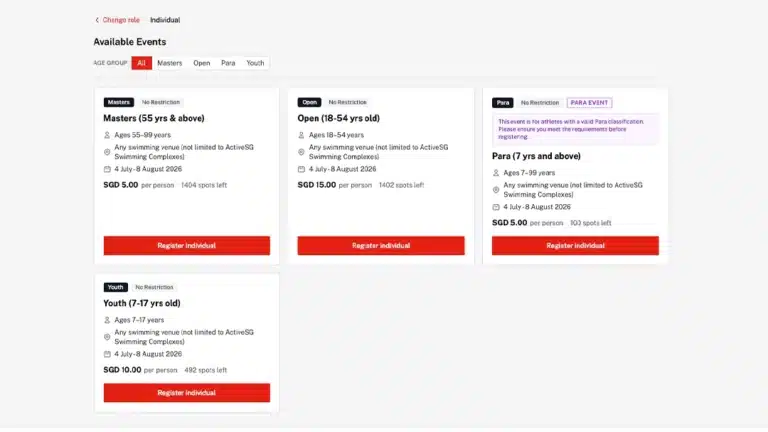
For Pesta Sukan 2026, part of GetActive! Singapore, Klobbi’s registration platform managed close to 50,000 participants across 40 sports and more than 1,500 individual sporting events. That type of programme requires far more than a single registration form: participant data has to remain organised across different activities and continue to support event operations at scale.

For the LKY100 “Now Is Not The Time” exhibition, Klobbi was required to get the registration experience live on a tight two-week timeline for a diverse public audience. The project demonstrates why managed implementation matters when deadlines, attendee experience and event operations all have to move together.
These projects are useful because they show the role of attendee registration in the wider event operation: the form is only the beginning.
FAQs
An attendee registration system is software used to collect and manage attendee information before an event and connect that data to later steps such as confirmations, QR credentials, check-in, badges and attendance reporting. More advanced systems can also support different attendee types, payments, event-specific fields and integrations.
Ticketing focuses mainly on issuing or selling admission to an event. Attendee registration is broader: it can collect event-specific information, organise attendee categories, manage communications, connect registration data to onsite check-in and support reporting after the event. Some events need both in the same workflow.
Yes. Klobbi supports customised registration fields, categories and forms designed for different attendee types. An organiser can structure the registration experience around the information required from delegates, guests, participants, VIPs, staff or other event groups rather than using one generic form for everyone.
Klobbi supports group-booking requirements for conference and event registration. The exact workflow should be defined during setup because the organiser may need individual attendee records, shared or separate payment handling, and different confirmation or badge requirements for each person in the group.
Yes. Klobbi can connect registration data to QR-code check-in and on-demand badge printing. The attendee’s registration information can therefore continue into the event-day workflow instead of being re-entered into a separate system at the door.
Collect only the information the event genuinely needs. Common fields include name, email, organisation, job title, attendee category, dietary requirements, accessibility needs and event or session preferences. The right fields depend on the attendee type and the operational decisions the organiser needs to make.
The terms often overlap. “Audience registration system” is commonly used for public-facing or large-audience events, while “attendee registration system” is a broader term used across conferences, corporate events, public programmes and other formats. The underlying job is similar: capture accurate registration data and carry it into the rest of the event workflow.
Klobbi uses encrypted data handling and operates registration workflows around Singapore’s PDPA requirements. Klobbi Pte Ltd’s information security management system is certified to ISO/IEC 27001:2022, and the company holds the CSA Cyber Trust Mark at Promoter tier. Event-specific data handling, residency and integration requirements can be documented during project scoping.