
Klobbi EventApp
Home › Solutions › Event apps › Event web app
Klobbi EventApp Web · nothing to install
Klobbi EventApp Web is an event web app in Thailand that runs in the phone's browser. Guests tap a link from LINE or email, or scan a QR code, and install nothing. It carries the schedule, speakers, sponsors, networking and a check-in QR code. CNN Global Perspectives: In Bangkok ran on it. Klobbi's Bangkok team supports events in Thailand.
Klobbi Pte Ltd (Singapore): ISO/IEC 27001 certified · Singapore's CSA Cyber Trust mark · Team in Bangkok
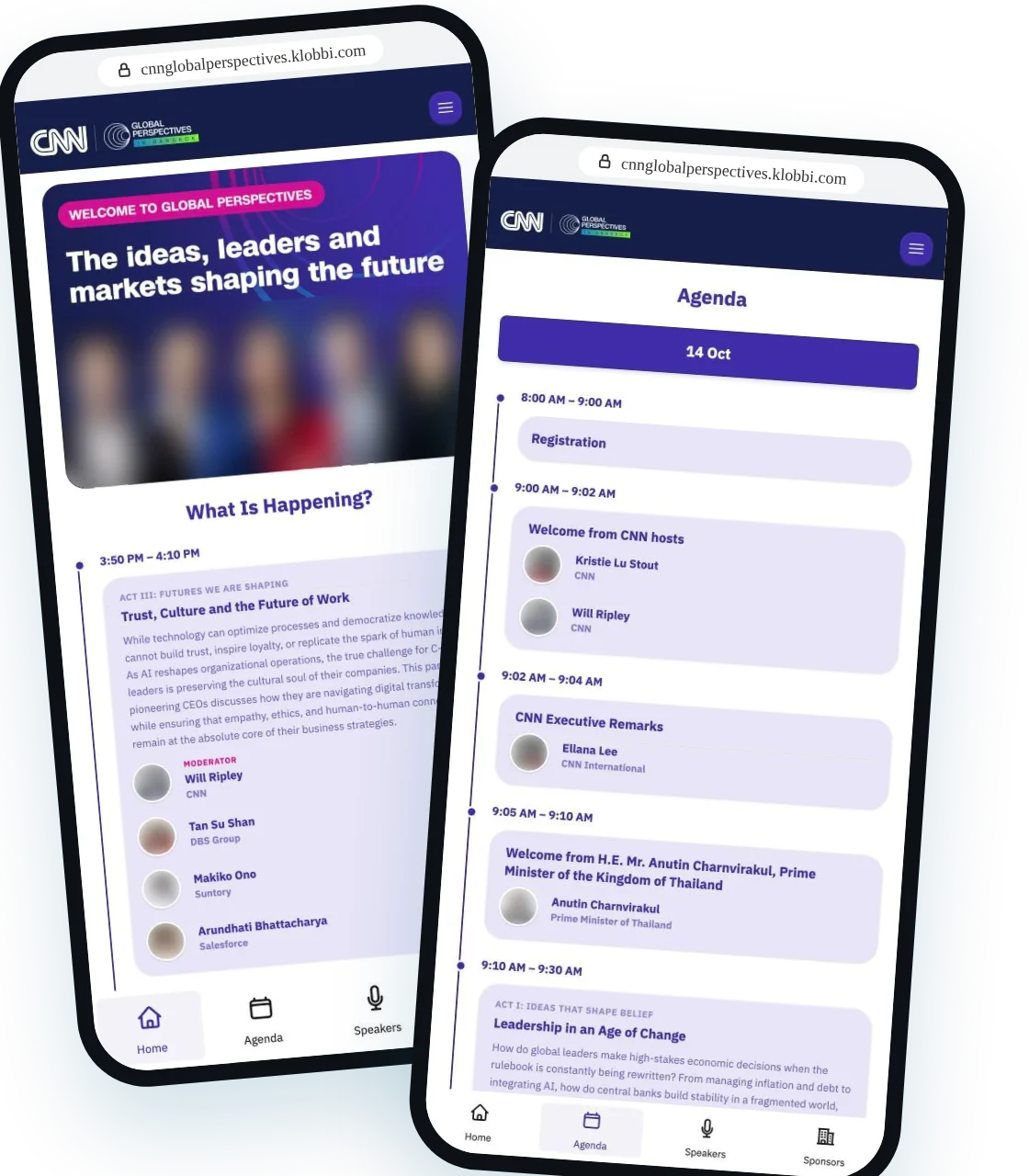
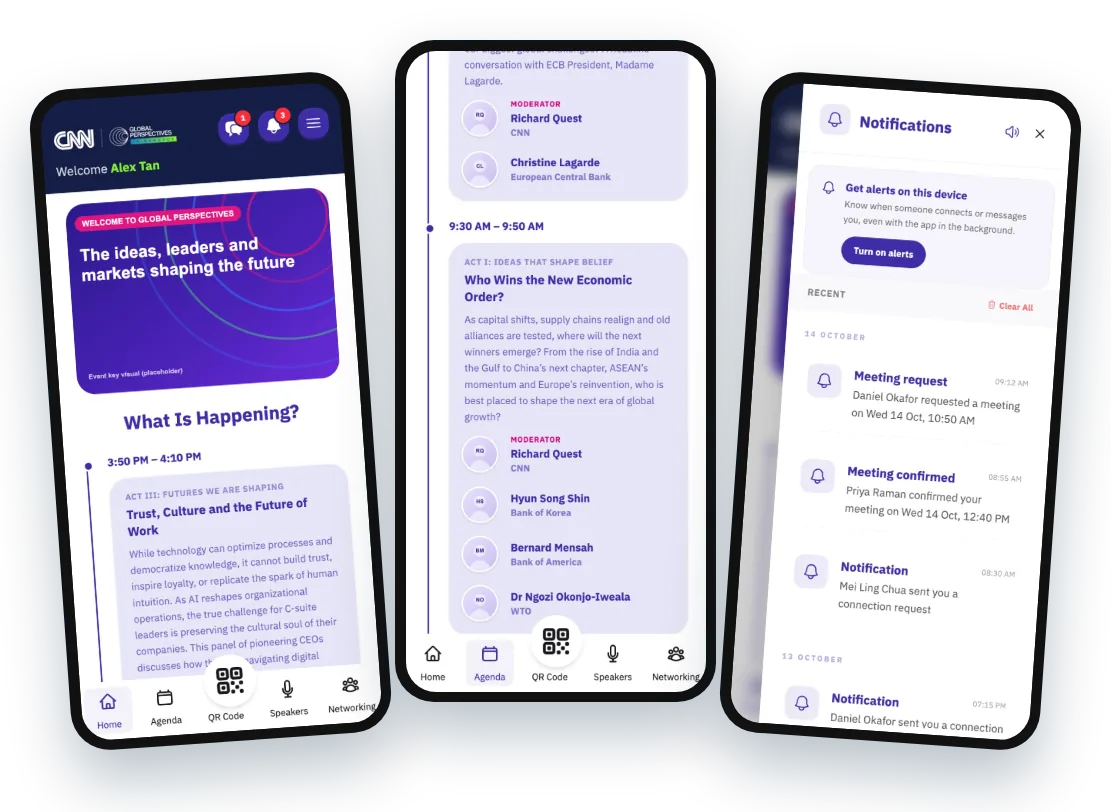
Screens from a real event; attendee details are samples.
CNN Global Perspectives: In Bangkok took place on October 14, 2026, at The Ritz-Carlton, Bangkok. Guests opened the web app on their own phones to check the schedule, read speaker bios, look up sponsors and connect with other guests. Nobody had to download an app before arriving.
29
items on the schedule
43
speakers, each with a bio page in the web app
10
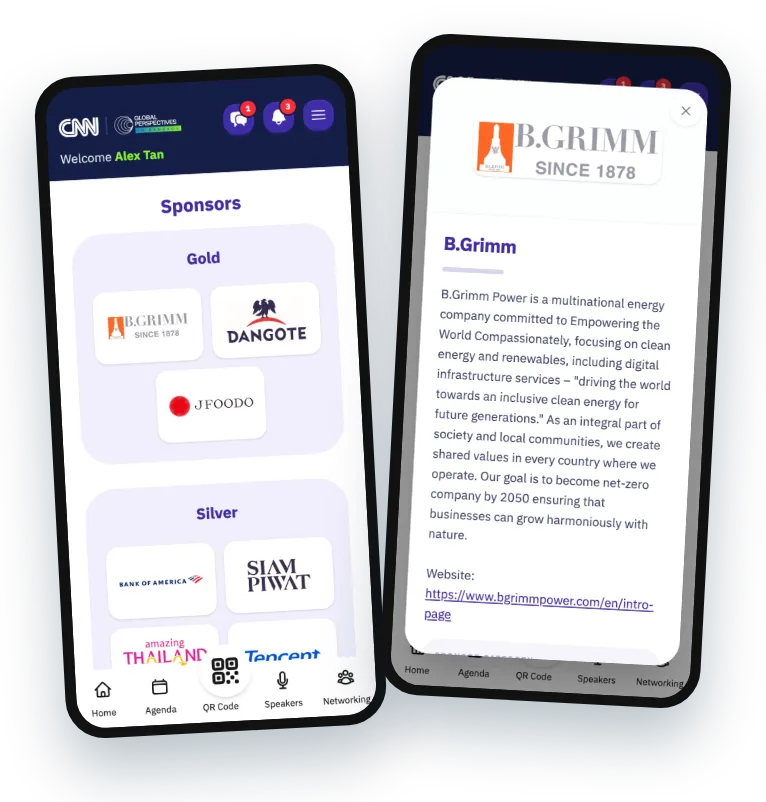
sponsors with pages of their own
0
apps to download
The event shows why a web app fits international conferences in Bangkok, where guests come from many organizations and countries: everyone gets in at once through a single link.
Each event's web app has its own link. You send that link through channels your guests already use, and a single tap puts the event on their screen.
Put the link in a message to guests, in the event's LINE group, or in an announcement from your organization's official account. Guests tap it and the web app opens.
Every registrant receives a link of their own that signs them in right away, with no password to remember.
Print it on a standee by the registration point. Guests who just walked in scan it with the phone camera and see the schedule.
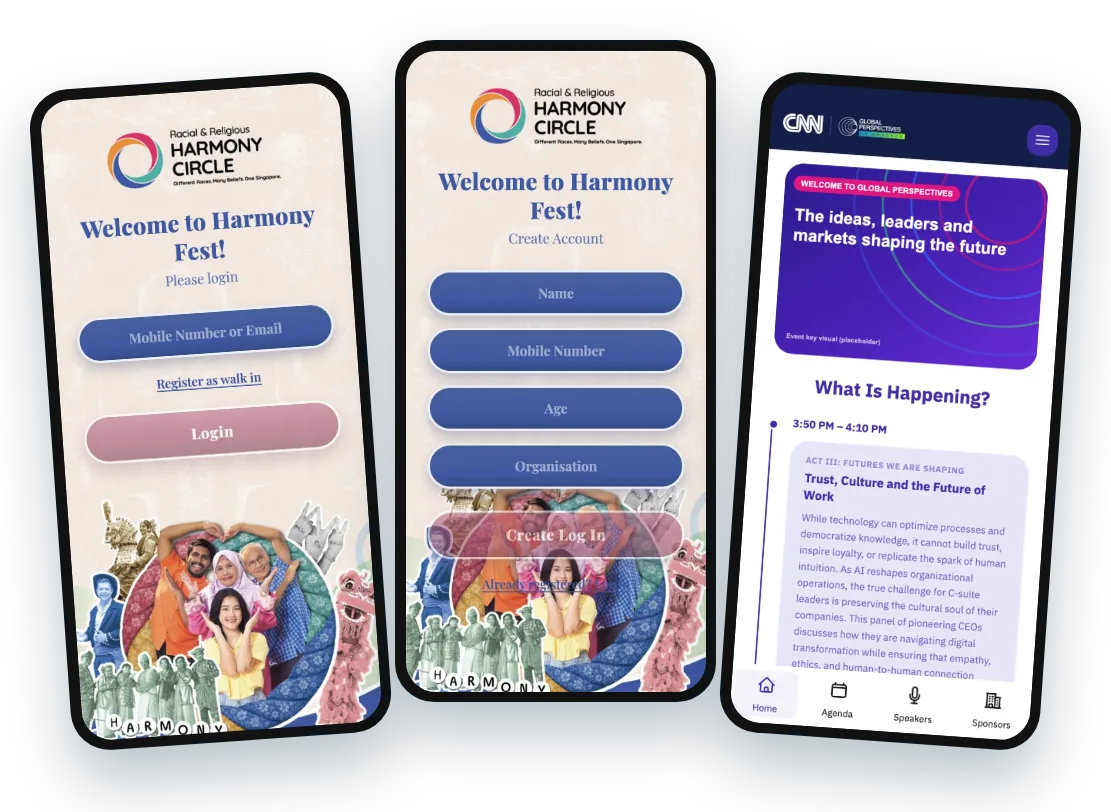
The link shared in LINE is an ordinary web link. The web app is not an app that runs inside LINE, and guests do not need a LINE account.
Every step between an invitation and an app loses some guests. Searching for the app, downloading, installing and creating an account are all points where people give up. A web app cuts this to one step, a tap, so more people actually use it. What the organizer trades away is some of the control a downloaded app would give.
Work phones are the second reason. Many government agencies and large companies lock their phones to approved apps only, so an app from a store may never get installed. A web app installs nothing, so that lock does not get in the way. The phone just needs a browser and an internet connection.
If you want members to sign in before seeing anything and you want to send lock-screen alerts, see the mobile event app.
Anyone without a personal link can still look at the schedule, speakers and sponsors in guest mode. That helps when you want people to see what is on before they decide to attend.
Besides the personal link in their email, guests at open events can sign in with a mobile number or an email address. Walk-ins who did not register enter their name, mobile number and organization at the door, and a number that is already registered is recognized. For closed events, add a one-time passcode (OTP).
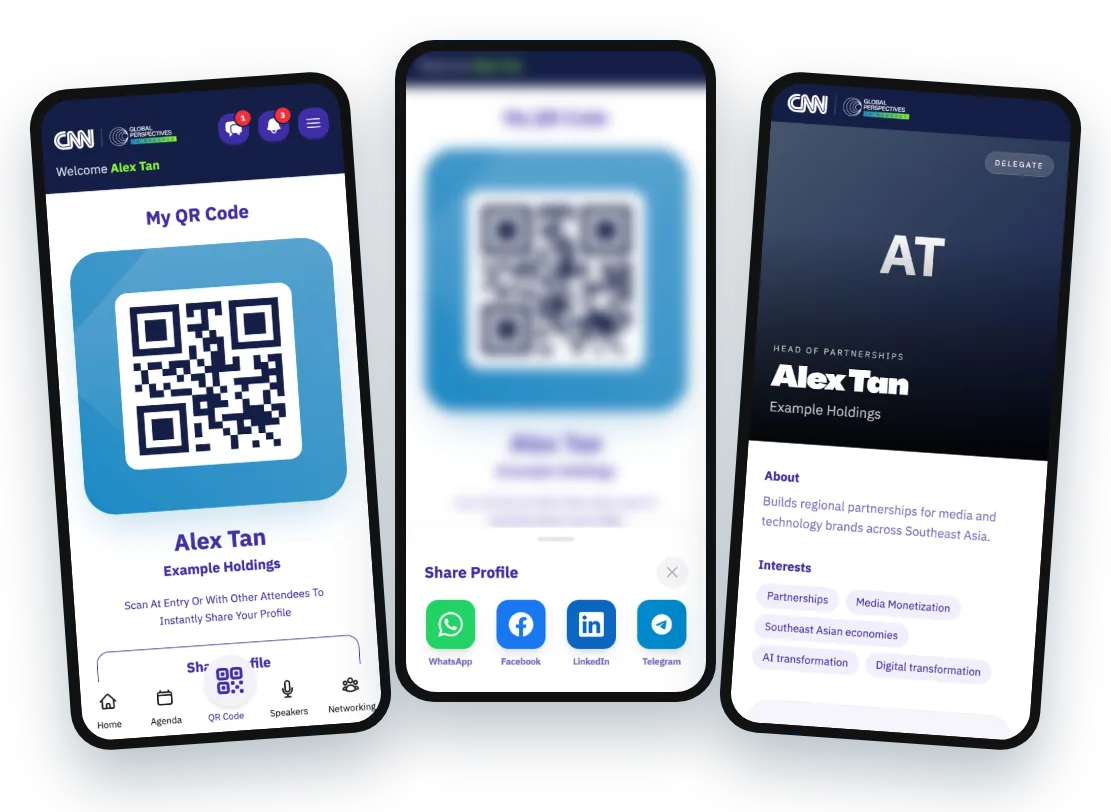
A guest's single QR code is their ticket, their check-in and their digital business card. They can save it to Apple Wallet or Google Wallet from the browser, so it opens even after they close the web app.
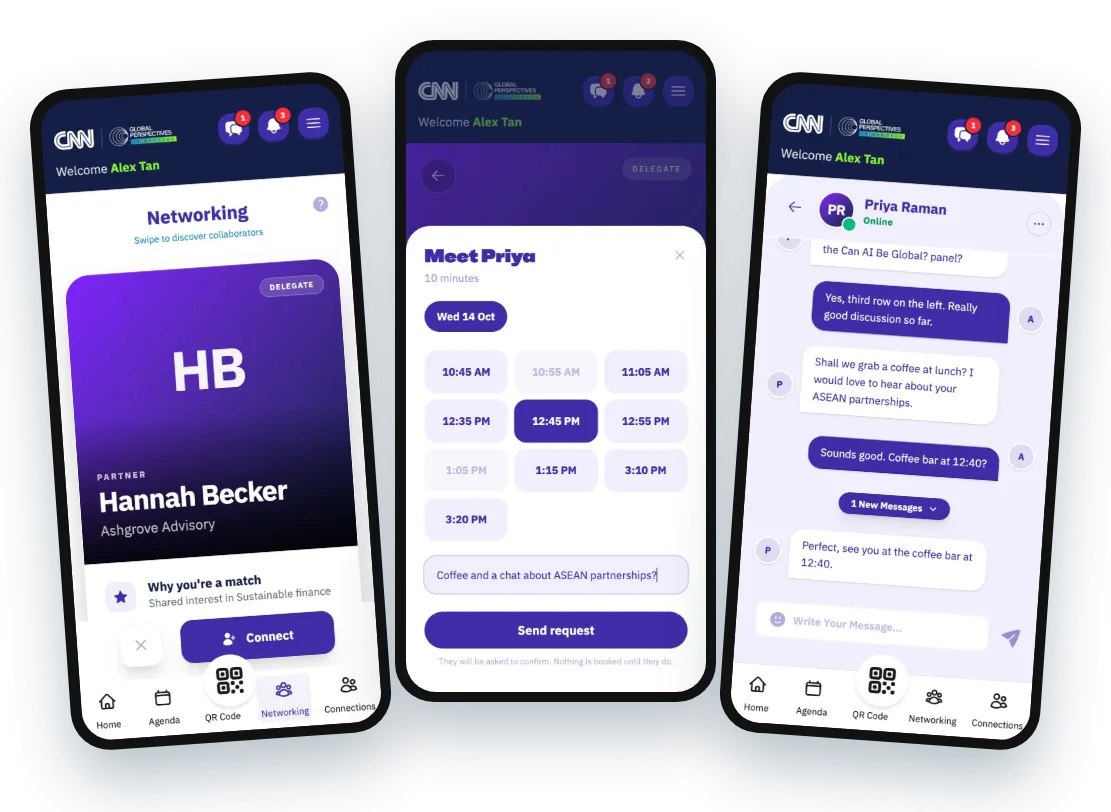
The first visit to networking shows a short guide on how it works. Guests who opt in to networking see one card at a time for people with shared interests, with the reason they match, and choose to connect or skip. They can share their profile on WhatsApp, LinkedIn, Facebook or Telegram.
Exhibitors are listed by category with booth numbers, and sponsors by tier. Each has a digital booth with brochures, videos and links, and with the Klobbi Meet add-on, guests can book a time to meet from the booth page.
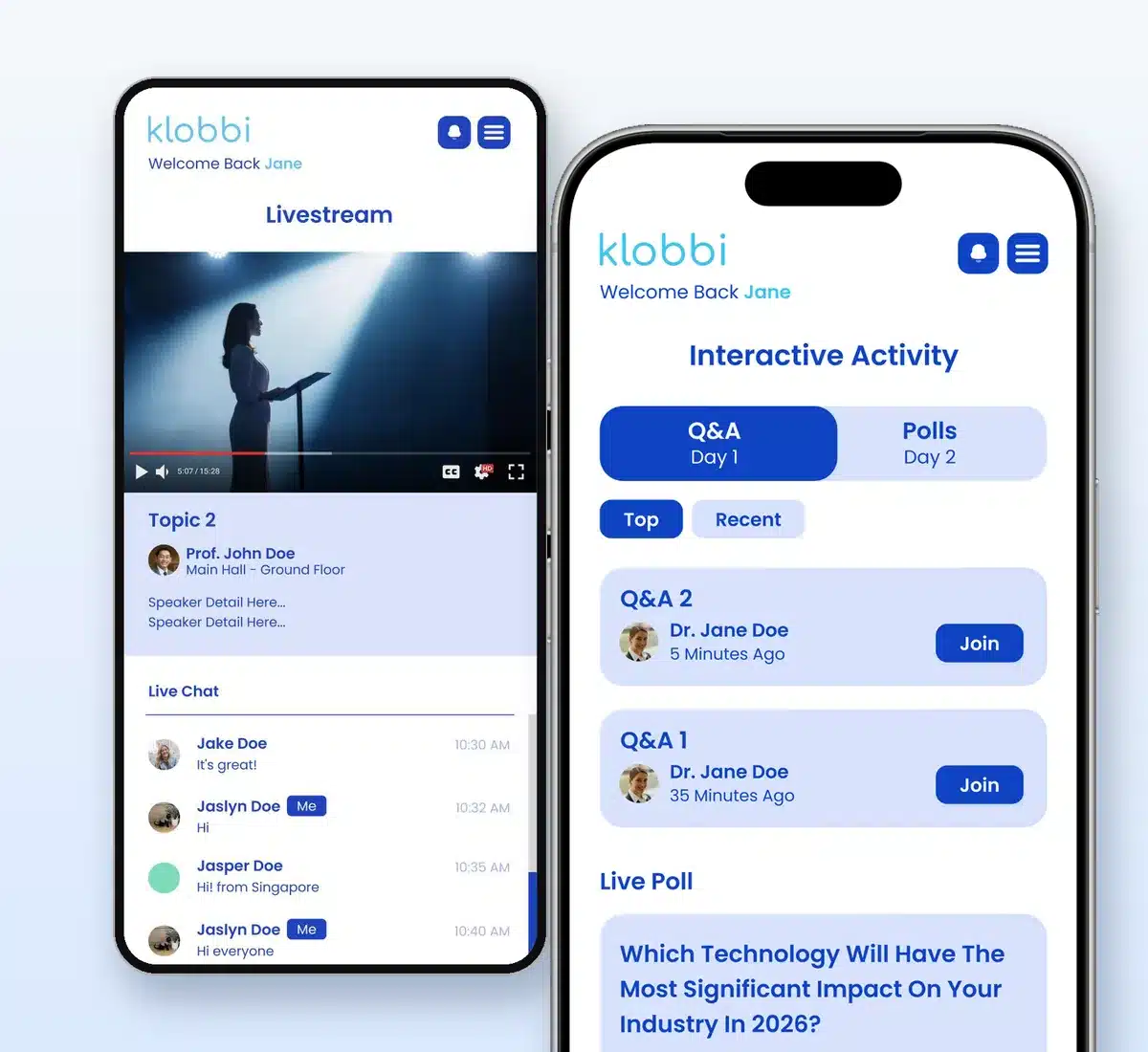
The audience sends questions, upvotes the ones they want the speaker to answer and responds to polls from the session screen in the same web app. More on the conference audience engagement page.
In Event Passport mode, guests scan a QR code at each station to collect a stamp and claim a prize once they meet the rule you set. SIT Open House 2026 in Singapore used this mode with 10,000 visitors over two days.
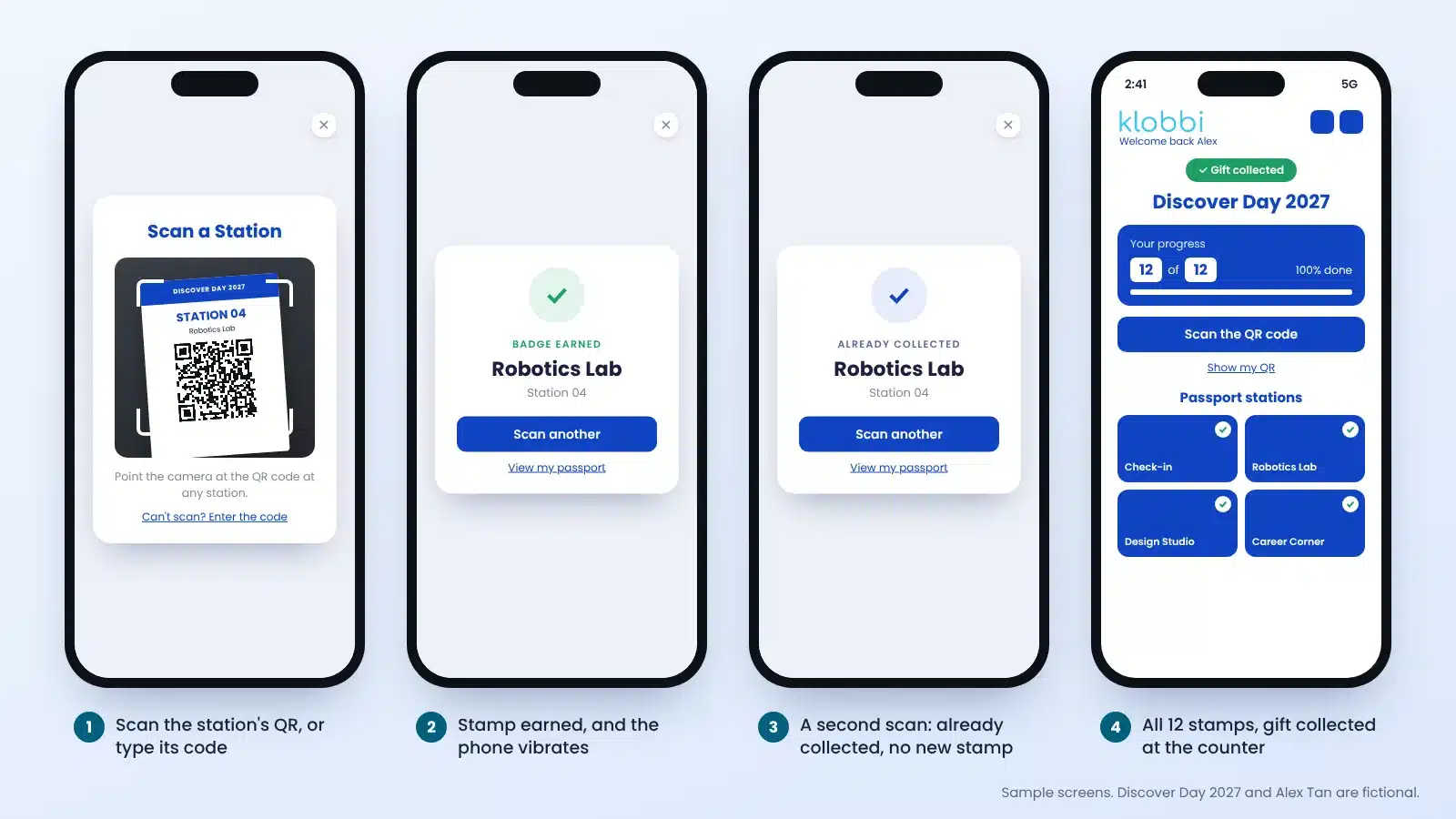
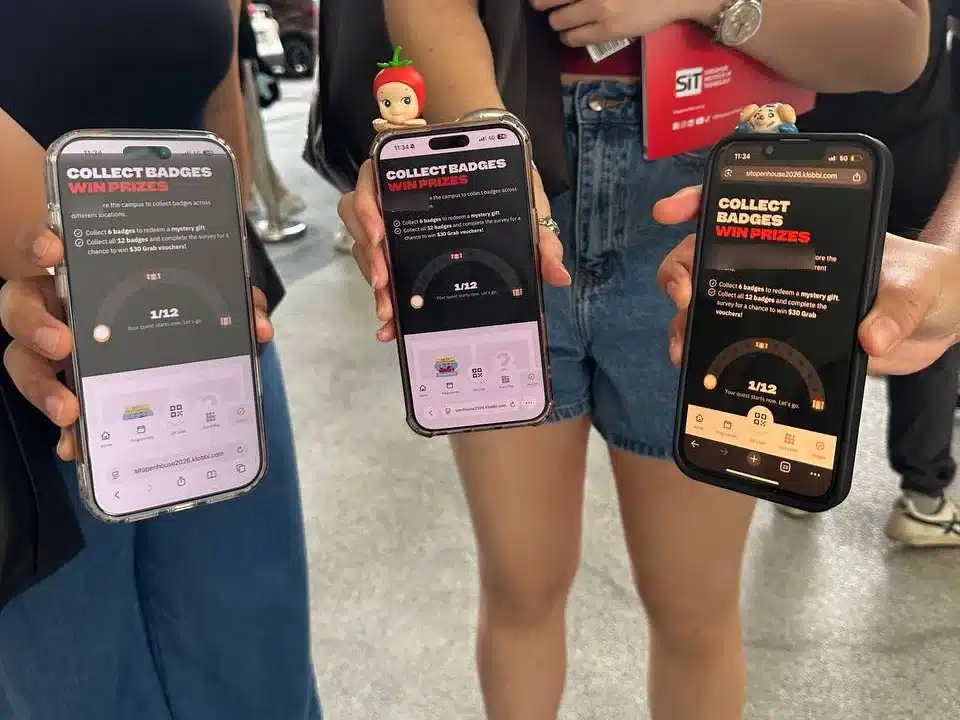
No feature needs an installed app. Organizers switch on only what the event needs.
• A personal link in the invitation email that signs guests in with one tap
• Guest mode for browsing the schedule, speakers and sponsors
• Sign-in by mobile number or email at events open to everyone
• On-the-spot sign-up for walk-ins who did not register
• A one-time passcode (OTP) for closed events
• Browser alerts about meetings and connection requests
• One QR code for entry, check-in, card swaps, activities and prizes
• Saved to Apple Wallet or Google Wallet from the browser
• A public profile page that opens from a shared link
• The digital business card stays live after the event
• Time or room changes appear in every guest's browser at once
• My Agenda for the sessions each guest plans to attend
• Sign-up for smaller activities held inside the event
• Speaker bios and abstracts one tap from the schedule
• Event map with directions to halls, meeting rooms and booths
• Session and event feedback forms
• Browser streaming for people outside the room
• Chat and emoji while watching
• Audience questions with upvotes, cleared by the moderator first
• Polls with results on the big screen in the room
• Message wall and personality quiz; see conference audience engagement
• Captions, translation and an AI summary when you add Klobbi Oracle
• A short guide on the first visit to networking
• Opt in to networking, or stay out of view
• Cards for people with the same interests, with the reason shown
• Search guests by name, job title or company
• One-to-one chat and ten-minute meetings during breaks
• Sponsors by tier, each with a page
• Digital booths holding brochures, videos and links
• Exhibitors by category and booth number
• Reports on who opened each page or scanned each booth QR code
• Exhibitor meetings through the Klobbi Meet add-on
• Lead Retrieval and Klobbi Match add-ons when the event calls for them
• Scan a stamp at each station and watch the progress bar
• Guests scan the station sign, or staff scan the guest
• Rules for every station, a set number, or prize tiers
• Pickup at a counter or an automatic prize machine, once per guest
• Printed QR cards for guests who would rather not use a smartphone
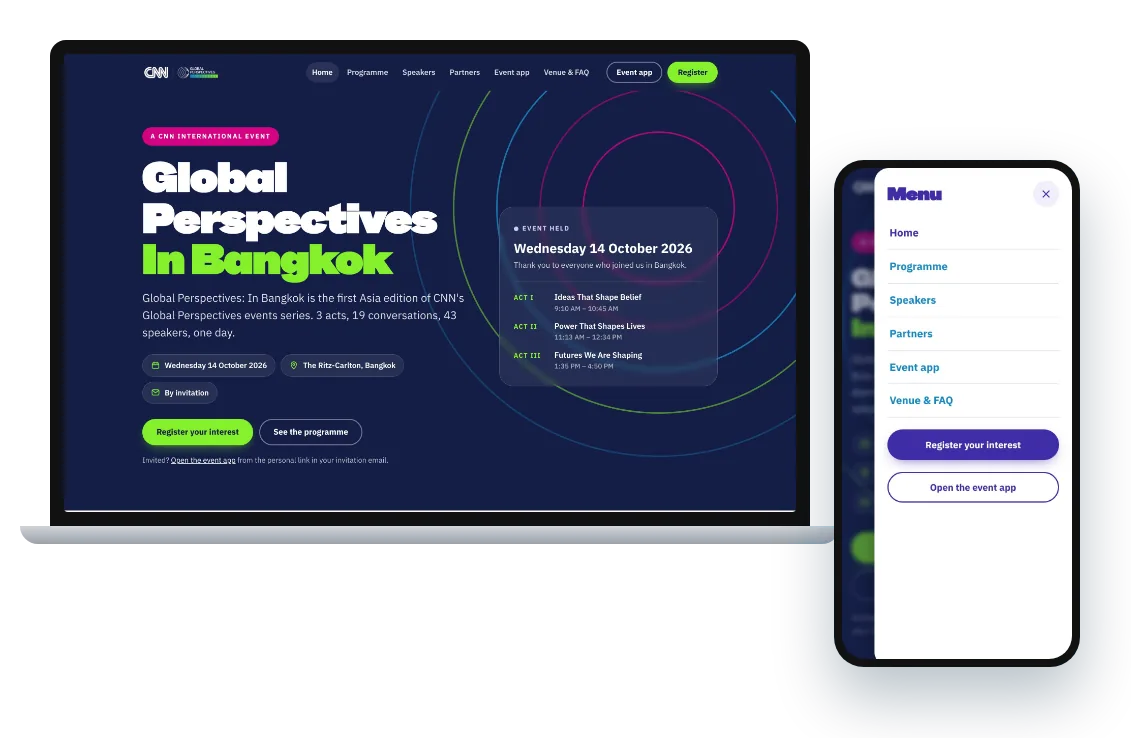
• Your logo, colors and banner on every page
• A public event website that draws on the same data as the web app
• Opens on a laptop as well as a phone
• A back office for notices, stamp stations and prizes, with no coding
• An activity report after the event
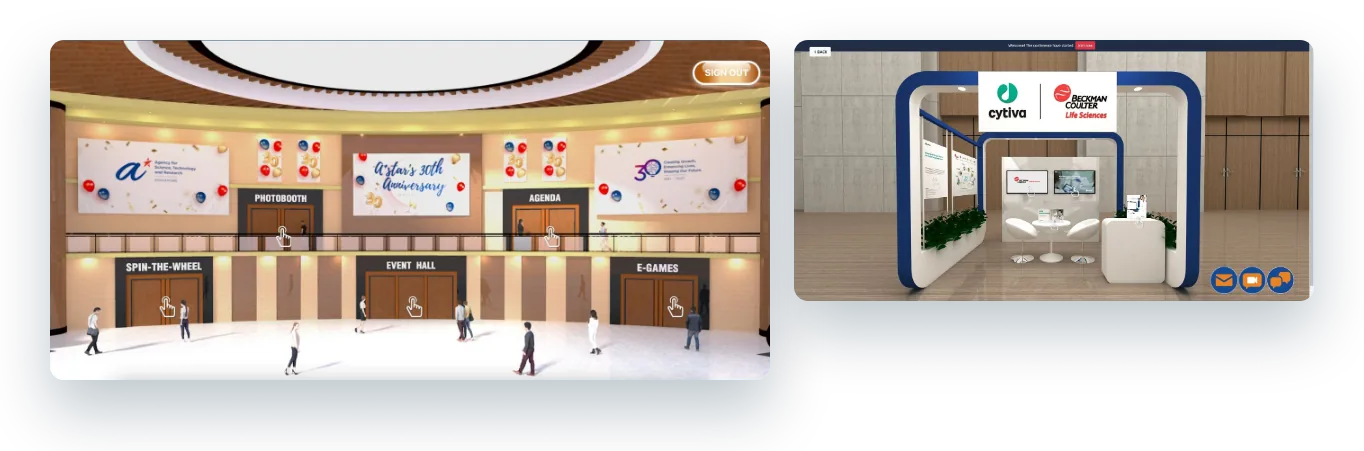
The same web app can become a virtual venue with a 3D lobby, an exhibition hall and streaming. See the overview of our event app in Thailand.
International conferences in Bangkok usually mix Thai and foreign guests, and many are run by a professional conference organizer (PCO) together with the event owner. The web app fits these events for two reasons.
Thai and English in one event. The web app supports a Thai-language interface and Thai forms, and organizers can enter the schedule and speaker bios in both languages. For Thai captions or Thai-English translation during the session, add Klobbi Oracle.
Branding for each event. Logo, colors and banner change per event, and the public event website draws on the same schedule, speakers and sponsors as the web app, so the PCO never edits information in two places.
Klobbi's Bangkok team works with event owners and PCOs in both Thai and English.
Table 1. Web app and mobile app, when the goal is the most people using it.
Question
Web app (EventApp Web)
Mobile app (EventApp Mobile)
How guests start
Tap a link in LINE or email, or scan a QR code
Install on iPhone or Android, then sign in
Guests who did not register
Browse in guest mode, or sign up at the door
Must sign in first
Work phones that limit installs
Nothing to install, so it works
Installs only where the organization allows it
Ticket at the door
QR in Apple Wallet, Google Wallet or the browser
QR inside the app
Lead time
From one week
Six weeks or more
For a side-by-side overview, see mobile and web event apps compared.
From one week, using Klobbi's templates. You send the content; we build the web app, connect it to registration and check-in, and handle event day together with you.
1
Schedule with times and rooms, speaker bios and photos, sponsor list with logos, and the event banner artwork.
2
Klobbi's team loads your content into a template and walks you through it before guests see it.
3
Send it in the registration confirmation email and in LINE, and print the QR code for the venue.
4
Check-in points scan each guest's QR code; anyone who cannot find theirs is looked up by name.
5
When the schedule changes, everyone sees the new time in the web app right away.
The web app opens as a web page, so nobody downloads a large app file over the venue Wi-Fi. Guests still need an internet connection the whole time they use it, and hotel ballrooms and large convention halls often have spots where mobile signal drops.
Before the event, test Wi-Fi in every room you will actually use, and print the network name and password next to the QR code on the sign at each door. Guests can then connect and open the web app in one go.
EventApp guest data is stored on servers in Singapore and deleted within 30 days after the event. The guest list belongs to the organizer; Klobbi does not use it for marketing and does not sell it.
Klobbi Pte Ltd in Singapore, which develops and runs the system, is ISO/IEC 27001 certified by TÜV SÜD and holds the CSA Cyber Trust mark, a certification scheme run in Singapore. Klobbi works to Thailand's Personal Data Protection Act B.E. 2562 (2019). More on the data security page.
Share the date, venue, a rough headcount and how you plan to send the link to guests. Our Bangkok team replies within one business day.
WhatsApp +65 8836 2597 Email sales@klobbi.comIs Klobbi's web app an app that runs inside LINE?
No. It is a web page that opens from a link. Organizers can post that link in a LINE message, but the system does not connect to guests' LINE accounts.
Can we post the web app link in a broadcast from our LINE Official Account?
Yes. The link is an ordinary web link, so it goes into a broadcast, a group message or a private chat in LINE like any other link. Anyone who taps it sees the schedule in guest mode, and registered guests sign in with the personal link in their email.
A guest arrives and can't find the invitation email. How do they get into the web app?
They scan the QR code on the standee at the registration point and see the schedule right away. At events open to everyone they can sign in with a mobile number or email, and at check-in the team can look them up by name.
Can events open to the public, such as open houses or trade shows, use the web app?
Yes. Visitors browse the schedule in guest mode right away, sign in with a mobile number or email, or sign up at the door with their name, mobile number and organization. SIT Open House 2026 in Singapore used the web app with 10,000 visitors over two days.
How do foreign guests without mobile data in Thailand use the web app?
The web app needs an internet connection, so guests without a Thai SIM or data plan have to join the venue Wi-Fi. Print the network name and password next to the QR code at the registration point.
Does the web app open on a laptop?
Yes. On a laptop it shows as a phone-width column, which suits organizers checking the look before the event and guests who are sitting at a computer.
Does the digital business card in the web app still work after the event?
Yes. A guest's digital business card keeps working after the event and can be passed on through WhatsApp, LinkedIn, Facebook or Telegram. The shared link opens that guest's public profile page.