
In this guide
- What is form software?
- Event form vs generic form
- Start with the attendee record
- Essential vs optional fields
- Choose the right field type
- Attendee types and conditional logic
- Group registration
- Ticket, pass and payment choices
- Mobile UX and accessibility
- Validation and data quality
- Consent, purpose and PDPA
- After someone submits
- Reusable form templates
- QA checklist before launch
- Common form mistakes
- When a generic builder is enough
- How Klobbi forms fit
- FAQs
What Is Event Registration Form Software?
Event registration form software is the form-building layer of an event registration system. It is used to collect attendee information, apply registration rules, create structured attendee records and pass that data into the next stages of the event workflow.
A basic form can collect information. Event-specific registration software can go further by connecting that information to attendee categories, ticket or pass types, payments, confirmations, QR credentials, onsite check-in, badges and reporting.
The most useful way to think about the relationship is:
- FORM FIELD
- ATTENDEE RECORD
- CONFIRMATION / PAYMENT
- QR / CHECK-IN
- BADGE
- REPORTING
If your event only needs a simple RSVP, a generic form tool may be enough. When the form has to support multiple attendee types, paid registration, group bookings or onsite operations, the wider event registration platform becomes much more important because the information needs to stay connected after submission.
What Makes an Event Registration Form Different from a Generic Online Form?
A generic online form is usually built to collect information and send it somewhere. That can work perfectly well for a small, free event with one audience type and no complex follow-up.
An event registration form has a different job when the data affects what happens next. A person’s attendee type may determine which questions appear. A ticket or pass may determine price or access. A company name may be used on a badge. A dietary requirement may need to reach the operations team. A payment state may determine whether the registration is complete.
This is the key distinction: the value of an event form is not only in collecting data, but in creating an attendee record that remains usable across the rest of the event.
Teams that want a broader view of how the form fits into the full registration lifecycle can use Klobbi’s event registration software guide to understand the relationship between registration, payments, communications, check-in, badges and reporting.
Start With the Attendee Record, Not the Form Layout
Before choosing fields, define what the system needs to know about each attendee and what decisions that data will support.
A useful test is to ask why each field exists. Does it affect communication? Payment? Eligibility? Session choice? Badge output? Accessibility? Reporting? Another legitimate operational purpose? If the answer is unclear, the field may not belong on the form.
This approach also makes the form easier to maintain. Instead of adding questions whenever someone on the team asks for another data point, the organiser can evaluate whether the field has a real downstream use.
For events with multiple audience groups, this planning stage should also define the attendee categories before the form is built. A delegate, speaker, VIP, staff member or public participant may need different questions and a different registration path. Klobbi’s attendee registration system is designed around that kind of category-specific workflow.
Essential vs Optional Event Registration Form Fields
There is no universal list of fields that every event should require. The right set depends on the event, attendee type and downstream workflow. Use the following categories as a planning framework rather than a mandatory checklist.
Name
Usually required. It identifies the attendee and may also be used in confirmations, QR records, badges and reporting.
Email address
Usually required for online registration because it can support confirmation, reminders and attendee lookup. If email is used as a unique identifier, decide how duplicate or shared-email registrations will be handled.
Company or organisation
Common for conferences and corporate events, but not always necessary for public events. It may be used for attendee segmentation, reporting or badge output.
Job title or designation
Useful when the event genuinely needs professional information, for example for delegate profiles, reporting or printed badges. It should not be mandatory simply because the event is B2B.
Attendee type or category
Often one of the most important fields or system attributes because it can control the registration path. Examples include delegate, speaker, VIP, staff, exhibitor or public attendee.
Ticket or pass type
Relevant when attendees choose between different access levels, prices, event days or participation types. The selected pass should stay attached to the attendee record.
Phone number
Collect when there is a genuine communication or operational need. Do not make it mandatory by default if email is sufficient for the event.
Session or programme choices
Useful for conferences, workshops and multi-track events. Structured choices are usually better than free text because they can support reporting and downstream planning.
Dietary requirements
Collect only where catering or attendee support makes the information necessary. Use clear wording and ensure the data reaches the team that will act on it.
Accessibility requirements
Give attendees a clear way to communicate relevant access needs without forcing them to disclose more than necessary. The field should exist because the organiser has a process for acting on the information.
Consent and privacy acknowledgements
Consent wording should be purpose-specific and appropriate to the organiser’s data use. Operational registration notices and marketing consent should not be treated as interchangeable.
Payment-related information
Where the event is paid, the form may connect the attendee’s registration choice to the payment workflow. The attendee record should be able to reflect the relevant registration and payment state without requiring finance to rebuild the data separately.
Choose the Right Field Type
The way a question is structured affects both usability and data quality. Use free text where people genuinely need to write their own answer, but prefer structured controls when consistent values matter for automation, segmentation or reporting.
Short text
Good for names, job titles or other concise information that cannot be reliably pre-defined.
Dropdowns and radio buttons
Useful when the attendee must choose one value from a known set, such as attendee category, country, pass type or a yes/no response.
Checkboxes and multi-select
Useful when more than one option may apply, for example selecting multiple areas of interest or programme choices.
Date fields
Use when a date is genuinely required. The expected format should be clear and the input should be validated.
File upload
Some registration workflows may require supporting documents. Treat this as a general software capability to evaluate rather than assuming every registration platform supports it.
Consent controls
Consent or acknowledgement fields should make the purpose clear and should not rely on vague catch-all wording.
If a value will later be used to filter attendees, trigger logic or build a report, a controlled field usually produces cleaner data than an open text box.
Use Attendee Types and Conditional Logic to Keep Forms Relevant
A long universal form is rarely the best way to handle multiple audiences. Conditional logic allows the registration experience to change based on the attendee’s answers or category.
For example, if the attendee selects Speaker, speaker-specific questions can appear. If the attendee indicates a dietary requirement, a follow-up field can ask for the relevant details. If a particular pass includes a workshop choice, that question can appear only for people who selected the pass.
This makes the form more relevant and helps reduce unnecessary data collection because people are not shown questions that do not apply to them.
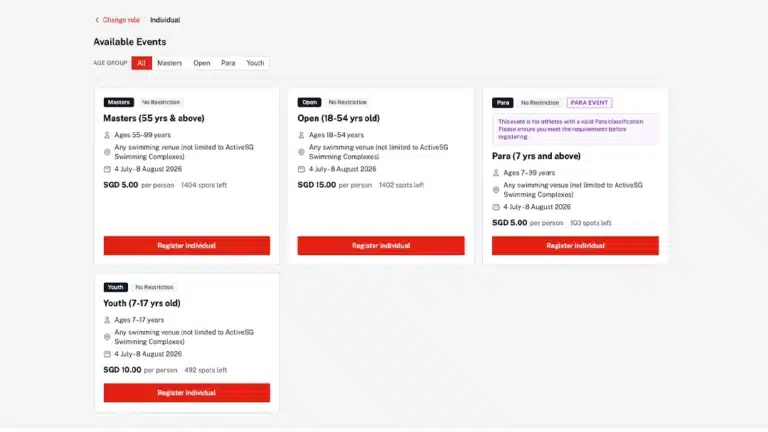
Klobbi’s current registration forms support different attendee types, customised fields and conditional fields, so the registration path can reflect the event rather than forcing every registrant through the same sequence.
Handle Group Registration Without Losing Individual Attendee Data
Group registration creates one of the most important data-model decisions in event registration: the person making the booking is not always the same as every person attending.
A useful structure is:
The coordinator may make the booking and payment, but individual attendees can still need their own name, email, dietary details, badge information or check-in record.
If a system stores only purchaser information, the event team may later struggle to issue correct badges, send personalised confirmations or identify individual people at the door.
Klobbi supports group bookings as part of its registration workflow. The exact data structure should be planned around the event so the organiser knows which information belongs to the booking and which information belongs to each attendee.
Connect Ticket, Pass, Session and Payment Choices to the Form
Ticket and pass choices are not just commercial options. They can also affect which information the form needs to collect.
A workshop pass may require a session choice. A VIP pass may need a different arrival instruction. A delegate category may have a different price or confirmation path. Those relationships should be designed before the form opens.
For paid events, the registration choice should stay connected to the payment state so the organiser can distinguish a completed paid registration from an incomplete or complimentary one.
Klobbi’s online event registration and payment workflow connects registration choices with supported payment methods and reconciliation, while this guide stays focused on how the form should feed the correct attendee and booking data into that process.
Mobile UX and Accessible Registration Forms
Registration forms should be easy to complete on a phone and understandable to people using different input methods or assistive technologies.

Use visible, descriptive labels for fields instead of relying on placeholder text alone. Clearly identify required and optional information. Where a specific format is expected, explain it before the attendee makes an error.
Keyboard users should be able to reach and operate the controls. Related choices should be grouped logically, and error messages should explain what needs to be corrected rather than simply saying the form is invalid.
The goal is not to add accessibility as a final technical check. It should influence the form structure from the beginning: clear labels, predictable order, understandable instructions, suitable field types and useful feedback.
Mobile usability matters for the same reason. Keep the sequence relevant, avoid unnecessary horizontal complexity and make sure the attendee can review what they entered before submitting where practical.
Validation and Data Quality Before Submission
Validation is not only about preventing a blank required field. It helps protect the quality of the attendee record that the rest of the event will depend on.
Useful checks may include valid email structure, required fields, accepted date formats, controlled dropdown values and sensible duplicate-handling rules. Client-side validation can improve the experience, but server-side validation is also important where the data needs to be trusted.
Clear error messages matter. If an email is invalid, tell the attendee which field needs attention. If a required value is missing, identify it. Do not return a generic error that forces the user to search the whole form.
Poor validation can become an event-day problem. A misspelled name may reach a badge. A duplicate record may confuse check-in. An inconsistent company name may create messy reporting. Data quality should therefore be treated as part of the registration workflow, not as post-event cleanup.
Consent, Purpose and PDPA Considerations in Singapore
A registration form may collect personal data, so the organiser should know why each field is being requested and how the information will be used.
Under Singapore’s PDPA, organisations should notify individuals of the purposes for collecting, using or disclosing personal data, obtain consent where required, limit collection and use to appropriate purposes, protect the information and stop retaining it when it is no longer needed for legal or business purposes.
That means the form should not collect personal data simply because the software makes the field available. The organiser should be able to explain the operational, legal or business reason for the collection.
NRIC numbers deserve particular caution. Current PDPC guidance restricts private-sector collection to situations where it is required by law or necessary to establish or verify identity to a high degree of accuracy. It should not be used as a routine registration identifier or authentication field.
Consent wording should also be written for the organiser’s actual purposes. Klobbi’s current public positioning is clear that consent wording can be provided by the organiser or its DPO rather than being invented by the software vendor.
Teams that need the deeper compliance and governance context can review Klobbi’s Singapore PDPA event-data guidance, while the event registration data security page covers Klobbi’s security credentials and procurement-oriented controls.
This section is practical form-design guidance, not legal advice.
What Happens After Someone Submits the Form?
The form should not become a dead end once the attendee clicks Submit. The information should create or update an attendee record that the next stages of the event can use.
A typical flow may look like:
- SUBMIT
- ATTENDEE RECORD
- STATUS / PAYMENT
- CONFIRMATION
- QR CREDENTIAL
- CHECK-IN
- BADGE
- ATTENDANCE / REPORTING
If the attendee’s name or organisation is needed on a badge, that field should already exist in the registration record. If attendee type affects confirmation wording, the category should be stored in a structured way. If a QR code will be used onsite, it should refer back to the same record.
This continuity is where event-specific form software becomes more valuable than a disconnected generic form. Klobbi’s event registration kiosk can use the attendee record for QR check-in and attendee lookup, while Klobbi’s event badge printing workflow can use approved attendee fields for onsite badge output.
Reusable Event Registration Form Templates
The templates below are starting structures. They are not universal forms. Remove any field that does not support a clear event requirement and add only the fields your workflow genuinely needs.
Template A: Corporate or Business Event
- First name
- Last name
- Work email
- Company / organisation
- Attendee type or invitation category
- Job title
- Phone number
- Dietary requirements
- Accessibility requirements
Conditional examples: If Attendee Type = VIP, show VIP-specific arrival information questions. If Dietary Requirement = Yes, reveal a details field. If the event is paid, connect the selected pass to the relevant payment path.
Downstream uses: confirmation, attendee segmentation, badge fields, check-in and attendance reporting.
Template B: Conference Delegate Registration
- First name
- Last name
- Organisation
- Delegate category
- Pass or ticket type
- Job title
- Day selection
- Session choices
- Dietary requirements
- Accessibility needs
- Group-booking details
- Payment where applicable
Conditional examples: Speaker category reveals presenter fields. Multi-day passes reveal day choices. Workshop passes reveal workshop selection.
For conferences where delegate categories, passes, sessions and group bookings are central to the event, the same form data can continue into Klobbi’s conference registration system rather than being rebuilt in a separate delegate database.
Template C: Invite-Only or VIP Event
- Name
- Approved email or invitation identifier
- Organisation where relevant
- Attendee category
- Role or designation
- Guest details where permitted
- Accessibility needs
- arrival requirements
Conditional examples: If Guest Allowed = Yes, reveal guest details. If attendee is a VIP category, show only the fields needed for that workflow rather than the full public-registration form.
The invitation or approval logic should be designed around the organiser’s actual access rules. Do not assume every form platform handles invite verification in the same way.
Template D: Exhibition or Trade Event
- Attendee category
- Name
- Company
- Job title where relevant
- Industry or role
- days attending
- interests
- accessibility requirements
- badge fields
- consent
Conditional examples: Exhibitor staff may see company or booth-related questions that public visitors do not. Multi-day events can reveal day-selection fields. Badge-related fields should be structured consistently if they will print onsite.
Registration Form QA Checklist Before Launch
A registration form should be tested like a real workflow, not just previewed visually.
- Test every attendee type and every conditional branch.
- Test on mobile and desktop.
- Check keyboard navigation and visible field labels.
- Confirm required and optional states are clear.
- Test invalid email, date and other formatted values.
- Test group registration with more than one attendee.
- Test the payment path where applicable.
- Confirm the correct confirmation is sent for each attendee type.
- Confirm the QR credential maps to the right attendee record.
- Check the fields that will appear on badges.
- Check exports and reporting values for consistency.
- Review consent wording and privacy notices.
- Test duplicate or shared-email scenarios where they may occur.
- If analytics or source tracking is configured, confirm it survives the registration flow.
The test should include realistic edge cases, not only one perfect attendee.
Common Event Registration Form Mistakes
Making too many fields mandatory
Required fields should support a clear need. Making every question mandatory adds friction and encourages poor-quality placeholder answers.
Using one universal form for every attendee
If speakers, VIPs, delegates and staff need different information, use attendee types and conditional logic instead of one oversized form.
Using free text where structured options are needed
Open text can be useful, but dropdowns or controlled choices are usually better when the value affects filtering, automation or reporting.
Collecting data with no defined purpose
Every extra field creates another piece of personal data to manage and protect.
Ignoring accessibility and mobile usability
A form that is hard to navigate or understand excludes users and creates avoidable errors.
Keeping only purchaser data for group bookings
If each attendee needs their own confirmation, badge or check-in record, the organiser needs individual attendee data.
Disconnecting the form from check-in and badge printing
When staff have to rebuild attendee data into separate onsite files, errors and inconsistencies multiply.
Changing fields at the last minute without downstream testing
A new or renamed field can affect confirmations, integrations, badge templates and reports. Re-test the whole path when the data structure changes.
When a Generic Form Builder Is Enough — and When It Is Not
A generic form builder may be completely adequate for a small event that only needs a few contact fields, no payment, no category-specific logic and a simple export.
Event-specific registration software becomes more useful when the organiser needs multiple attendee types, ticket or pass logic, conditional questions, group registration, payments, personalised confirmations, QR credentials, onsite check-in, badges, reporting or integrations to stay connected to one attendee record.
The right choice is therefore not ‘generic forms are bad’ or ‘event software is always better’. The right tool is the one that matches the complexity of the workflow.
How Klobbi Registration Forms Fit the Wider Platform
Klobbi builds registration forms around the event requirements rather than forcing organisers into one fixed template. Current Klobbi capabilities include customised fields and categories, different attendee types, conditional fields, group bookings, dietary and accessibility needs, mobile-first registration and personalised confirmations.
The same registration data can then continue into payments, QR ticketing, onsite check-in, badge printing and live registration or attendance reporting.
That matters because the form is not being treated as an isolated data-collection page. It is the first structured stage of the attendee workflow.
For organisers who need the commercial platform rather than the educational guide, Klobbi’s event registration platform brings those stages together with Singapore-based project and event-day support.
Frequently Asked Questions
What should an event registration form include?
Include only the information the event genuinely needs. Common fields include name, email, organisation, attendee type, ticket or pass choice, session choices, dietary or accessibility requirements and consent. The exact fields depend on the event workflow.
What is event registration form software?
It is software used to build event-specific registration forms and create structured attendee records that can continue into confirmations, payments, check-in, badges and reporting.
What is the difference between an event registration form and a generic form builder?
A generic form builder focuses on collecting information. Event registration form software is more useful when the data must stay connected to attendee categories, ticketing, payment, confirmations, check-in, badges or reporting.
How many fields should an event registration form have?
There is no universal ideal number. Ask only for information that supports the attendee experience, operations, payment, communication, reporting, compliance or another defined purpose. A relevant ten-field form can be better than an irrelevant five-field form.
What is conditional logic in an event registration form?
Conditional logic shows or hides questions based on an attendee’s category or earlier answers. It helps keep forms relevant and reduces unnecessary questions.
How do group registrations work?
One purchaser or coordinator may create a booking for several people, while each attendee can still have their own record for confirmations, dietary needs, badges and check-in.
Should every attendee have their own registration record?
If the event needs to communicate with, identify, badge or check in people individually, separate attendee records are usually much easier to manage than one shared purchaser record.
Can an event registration form collect payments?
Event registration software can connect a registration choice to a payment workflow. The important requirement is that the payment state remains linked to the correct attendee or booking record.
How should consent be handled on a Singapore event registration form?
The organiser should clearly notify attendees of the relevant purposes, obtain consent where required and avoid combining unrelated purposes into vague catch-all wording. The exact wording should reflect the organiser’s real data use and legal requirements.
Should an event registration form collect NRIC numbers?
Not by default. Current Singapore PDPC guidance allows private-sector collection where required by law or necessary to establish or verify identity to a high degree of accuracy. Organisers should consider alternatives when NRIC collection is not justified.
How do registration form fields connect to event badges and check-in?
The attendee record created by the form can carry approved fields into QR check-in and badge printing, reducing the need to re-enter or maintain the same data in separate onsite files.
What should be tested before an event registration form goes live?
Test each attendee type, conditional branch, mobile experience, validation rule, group-booking path, payment where applicable, confirmation, QR credential, badge fields, reports and consent text.